A React hook that measure an element's size and handle responsive components with highly-performant way, using ResizeObserver. Try it you will 👍🏻 it!
❤️ it? ⭐️ it on GitHub or Tweet about it.









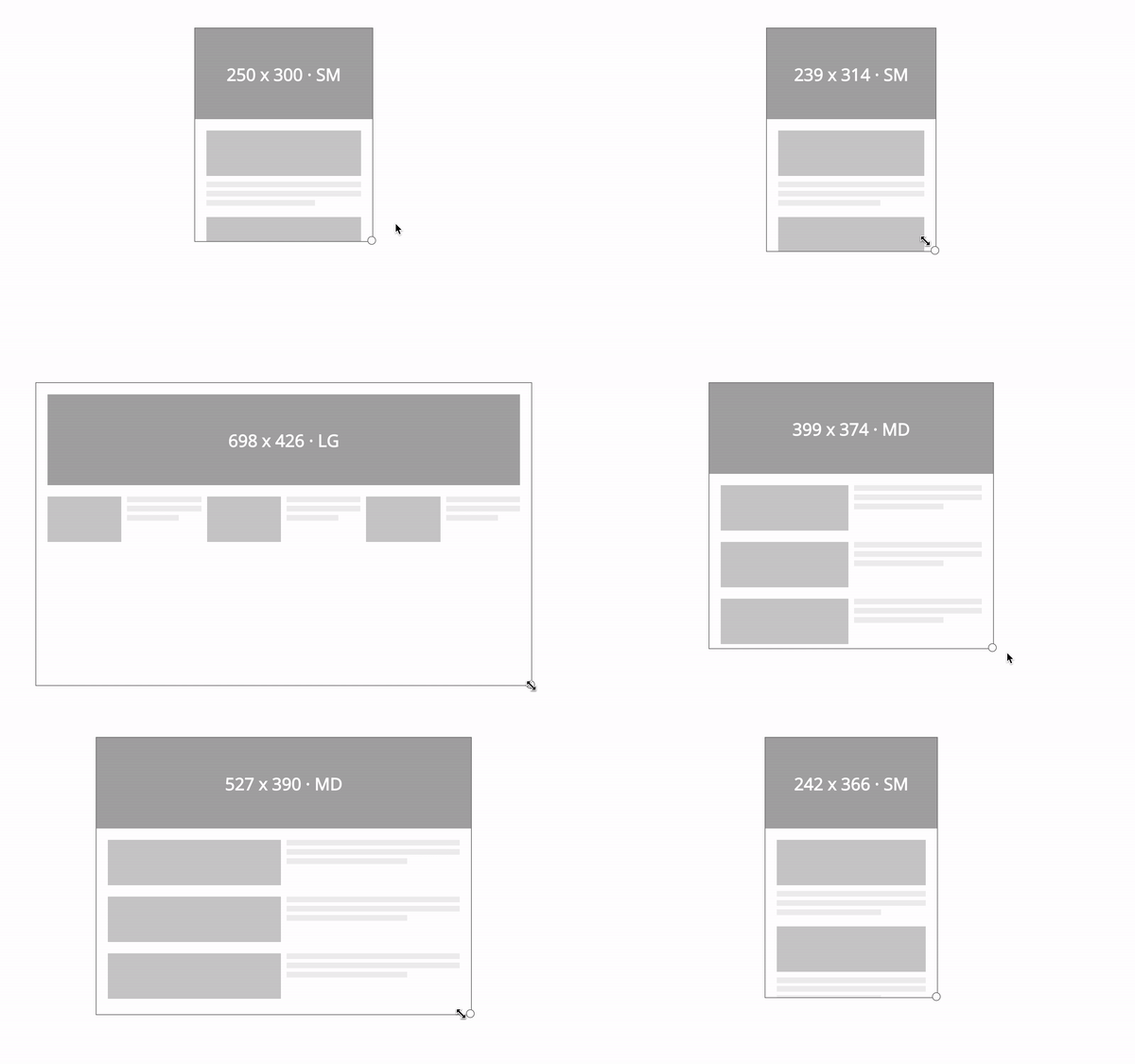
⚡️ Try yourself: https://react-cool-dimensions.netlify.app
- 🚀 Measures element's size with highly-performant way, using ResizeObserver.
- 🎣 Easy to use, based on React hook.
- 🍰 Easy to handle responsive components, provides an alternative solution to the container queries problem.
- 🎛 Super flexible API design to cover most cases for you.
- 📜 Supports TypeScript type definition.
- 🗄️ Server-side rendering compatibility.
- 🦠 Tiny size (~ 1.5KB gzipped). No external dependencies, aside for the
react.
To use react-cool-dimensions, you must use react@16.8.0 or greater which includes hooks.
This package is distributed via npm.
$ yarn add react-cool-dimensions
# or
$ npm install --save react-cool-dimensionsreact-cool-dimensions has a flexible API design, it can cover simple to complex use cases for you. Here are some example to show you how does it work.
⚠️ Most modern browsers support ResizeObserver natively. You can also use polyfill for full browser support.
To report the size of an element by the width and height states. Please note, it reports the content rectangle of the element.
import React, { useRef } from "react";
import useDimensions from "react-cool-dimensions";

const App = () => {
  const ref = useRef();
  const { width, height, entry, unobserve, observe } = useDimensions(ref, {
    onResize: ({ width, height, entry, unobserve, observe }) => {
      // Triggered whenever the size of the target is changed
    },
  });

  return (
    <div ref={ref}>
      Hi! My width is {width}px and height is {height}px
    </div>
  );
};We have media queries but those are based on the browser viewport not individual elements. In some case, we'd like to style components based on the width of a containing element rather than the browser viewport. To meet this demand there's a proposal for container queries, but it still doesn't exist today...
No worries, react-cool-dimensions provides an alternative solution for us! We can activate the responsive mode by the breakpoints option. It's a width-based solution, once it's activated we can easily apply different styles to a component according to the currentBreakpoint state. The overall concept as below.
import React, { useRef } from "react";
import useDimensions from "react-cool-dimensions";

const App = () => {
  const ref = useRef();
  const { currentBreakpoint } = useDimensions(ref, {
    // The "currentBreakpoint" will be the object key based on the target's width
    // for instance, 0px - 319px (currentBreakpoint = xs), 320px - 479px (currentBreakpoint = sm) and so on
    breakpoints: { xs: 0, sm: 320, md: 480, lg: 640 },
    onResize: ({ currentBreakpoint }) => {
      // Now the event callback will be triggered when breakpoint is changed
      // we can also access the "currentBreakpoint" here
    },
  });

  return (
    <div class={`card ${currentBreakpoint}`} ref={ref}>
      <div class="card-header">I'm 😎</div>
      <div class="card-body">I'm 👕</div>
      <div class="card-footer">I'm 👟</div>
    </div>
  );
};
Note: If the
breakpointsoption isn't set or there's on the defined breakpoint (object key) for a range of width. ThecurrentBreakpointwill be empty string;
The onResize event will be triggered whenever the size of the target element is changed. We can reduce the frequency of the event callback by activating the responsive mode or implementing our own throttled/debounced function as below.
import _ from "lodash";

const { width, height } = useDimensions(ref, {
  onResize: _.throttle(() => {
    // Triggered once per every 500 milliseconds
  }, 500),
});const returnObj = useDimensions(ref: RefObject<HTMLElement>, options?: object);It's returned with the following properties.
| Key | Type | Default | Description |
|---|---|---|---|
width |
number | The width of the target element in pixel, based on the content rectangle of the element. | |
height |
number | The height of the target element in pixel, based on the content rectangle of the element. | |
currentBreakpoint |
string | Indicates the current breakpoint of the responsive components. | |
entry |
object | The ResizeObserverEntry of the target element. | |
unobserve |
function | To stop observing the target element. | |
observe |
function | To re-start observing the target element once it's stopped observing. |
You must pass the ref to use this hook. The options provides the following configurations and event callback for you.
| Key | Type | Default | Description |
|---|---|---|---|
breakpoints |
object | Activates the responsive mode for responsive components or performance optimization. | |
onResize |
function | It's invoked whenever the size of the target element is changed. But in responsive mode, it's invoked based on the changing of the breakpoint rather than the size. | |
polyfill |
ResizeObserver | It's used for injecting a polyfill. |
ResizeObserver has good support amongst browsers, but it's not universal. You'll need to use polyfill for browsers that don't support it. Polyfills is something you should do consciously at the application level. Therefore react-cool-dimensions doesn't include it.
We recommend using resize-observer-polyfill:
$ yarn add resize-observer-polyfill
# or
$ npm install --save resize-observer-polyfill
Then inject it by the polyfill option:
import ResizeObserver from "resize-observer-polyfill";

const { width, height } = useDimensions(ref, { polyfill: ResizeObserver });
Or pollute the window object:
import ResizeObserver from "resize-observer-polyfill";

if (!window.ResizeObserver) window.ResizeObserver = ResizeObserver;Thanks goes to these wonderful people (emoji key):
 Welly 💻 📖 🚧 |
This project follows the all-contributors specification. Contributions of any kind welcome!