A zero-dependency Python CLI and library that translates English text into the fictional Monsu language using a word dictionary.



emtranslator is a dictionary-based translator for English and the fictional
Monsu language. It ships with a 90-word built-in dictionary, a emtrans command
line tool, and an embeddable Translator Python API. The package uses only the
Python standard library, so it installs and runs anywhere Python 3.8+ is
available.
More screenshots: View all screenshots
- Key Features
- Installation
- Quick Start
- Usage Examples
- Documentation
- Interface
- Architecture
- Requirements
- Prerequisites
- Development
- Contributing
- Security
- License
- Word-by-word translation using a built-in 90-word English-to-Monsu dictionary.
- Reverse translation (Monsu to English) via the
-r/--reverseflag or theTranslator(reverse=True)constructor. - Punctuation- and whitespace-aware: surrounding punctuation and spacing pass through translation unchanged.
- Case-insensitive lookup with casing preserved on the translated output.
- Unknown words are kept as-is and reported via
missing_words()/--json. - Extensible dictionary: add words from the CLI (
emtrans add) or the API (add_word()); additions persist to~/.config/neostore/emtranslator/config.toml. - Zero dependencies — standard library only.
Requires Python 3.8+.
git clone https://github.com/rkriad585/EMTranslator.git
cd EMTranslator
pip install -e .
This installs the emtrans command and the emtranslator package. On systems
where the Python user scripts directory is not on PATH, install with
python -m pip install -e . instead.
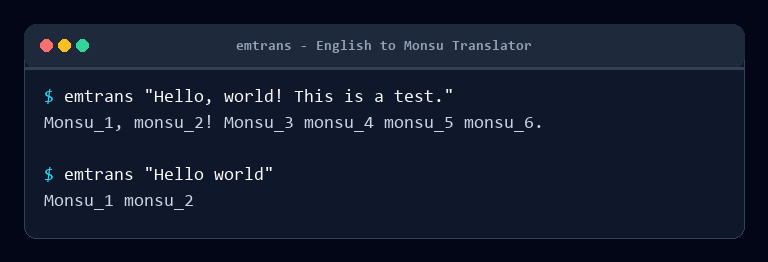
emtrans "Hello world"
# Monsu_1 monsu_2
from emtranslator import Translator
t = Translator()
print(t.translate("Hello world")) # Monsu_1 monsu_2Translate a sentence, preserving punctuation and unknown words:
emtrans "Hello, world! This is a test."
# Monsu_1, monsu_2! monsu_3 monsu_4 monsu_5 monsu_6.
Translate from Monsu back to English:
emtrans --reverse "monsu_1 monsu_2"
# hello world
Read from stdin:
echo "good morning" | emtrans
# monsu_13 monsu_14
Translate a file to another file:
emtrans translate -i input.txt -o output.txtGet JSON output including words missing from the dictionary:
emtrans --json "hello zebra"
# {
#   "original": "hello zebra",
#   "translated": "monsu_1 zebra",
#   "missing": ["zebra"],
#   "reverse": false
# }
Add a word and list the active dictionary:
emtrans add hi monsu_91
# Added hi -> monsu_91
emtrans list
# a: monsu_5
# ...
# hi: monsu_91
Use the library with a custom dictionary, in reverse mode, or with word persistence:
from emtranslator import Translator

t = Translator({"hi": "salut"})
t.translate("hi there")            # salut there

rev = Translator(reverse=True)
rev.translate("monsu_1")           # hello

t2 = Translator()
t2.add_word("hola", "monsu_91")    # persisted to config.toml
t2.missing_words("hello antelope") # ['antelope']| Document | Description |
|---|---|
| Getting Started | First steps: install, first translation, first word |
| Installation | Requirements and install instructions |
| Usage | CLI and library usage with examples |
| CLI Reference | Full emtrans command reference |
| Configuration | User dictionary, TOML format, migration |
| Architecture | Project layout and translation flow |
| Development | Set up a dev environment and run tests |
| Deployment | Packaging and running via Docker |
| FAQ | Frequently asked questions |
| Troubleshooting | Common problems and fixes |
| Screenshots | Screenshots of the project |
| API Reference | Translator class API |
CLI — emtrans with three subcommands: translate (the default), add, and
list. Run emtrans --help or emtrans <subcommand> --help for details.
Library — the emtranslator package exposes Translator,
DEFAULT_DICTIONARY, and __version__ from the top level:
from emtranslator import Translator, DEFAULT_DICTIONARY, __version__EMTranslator/
├── pyproject.toml # packaging + emtrans console script
├── src/emtranslator/
│ ├── __init__.py # public API surface
│ ├── __main__.py # python -m emtranslator entry point
│ ├── cli.py # argparse CLI (translate/add/list)
│ ├── core.py # Translator class + tokenizer
│ └── dictionary.py # DEFAULT_DICTIONARY + TOML persistence
├── tests/ # pytest suite (core + CLI)
├── tools/generate_screenshots.py # dev tool: renders Screenshots/*.png (Pillow)
├── docs/ # documentation
├── logo/logo.svg # project logo
└── Screenshots/ # screenshots
Translation flow:
Input text
   -> tokenize into words / punctuation / whitespace
   -> lower-case each word and look it up
      (built-in dict + user config + optional --dictionary file)
   -> unknown words pass through unchanged
   -> re-attach punctuation and whitespace
   -> output
- Python 3.8 or newer (declared as
requires-python = ">=3.8"). - No third-party runtime dependencies.
gitto clone the repository.pipfor the package and its build backend (setuptools>=61.0, pulled in automatically by pip).
git clone https://github.com/rkriad585/EMTranslator.git
cd EMTranslator
python -m pip install -e .
python -m pytest
The test suite covers the Translator API and the CLI (via subprocess). See
Development for details.
Contributions are welcome. Please read CONTRIBUTING.md before opening an issue or pull request, and note that all interactions are governed by our Code of Conduct.
This tool reads and writes only local files: your input text and the user
dictionary at ~/.config/neostore/emtranslator/config.toml. It makes no network
requests. To report a security issue, see SECURITY.md.
Distributed under the MIT License. See LICENSE for details.
- The fictional Monsu language and its vocabulary were created for this project.
- Built and maintained by RK Riad Khan.