



telenotify is a simple telegram, no webhook, user interaction python module able to be used from the command line or scripts globaly within the system.
Install using pip:
pip3 install git+https://github.com/s-razoes/telenotifyAfterward don't forget to add the credentials, these will be used system wide and no further configuration should be necessary.
After install and creating a bot you'll need to add the tokens and chats using these commands.
python3 -m telenotify.telegram_bots -ab BOT_NAME -t TOKENThe bot name is the one being called from the scripts
python3 -m telenotify.telegram_bots -db BOT_NAMEpython3 -m telenotify.telegram_bots -au USER_NAME -t CHAT_IDpython3 -m telenotify.telegram_bots -su USER_NAMEpython3 -m telenotify.telegram_bots -du USER_NAMEBOT_NAME is optional will define which bot the notifications will come, if not present will use the default.
USER_NAME is optional will define which user will receive the message/file.
Send notification to user from bash:
telenotify BOT_NAME USER_NAME MessageAsk user a question and wait for reply:
telequestion BOT_NAME USER_NAME QuestionSend broadcast message to all users in the configuration:
telebroad BOT_NAME MessageSend file from system to user:
telefile BOT_NAME USER_NAME FILE_PATH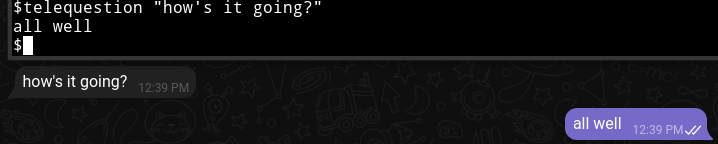
The BOT_NAME and USER_NAME are optional, if none are set, the defaults will be used.
from telenotify import user_interactionuser_interaction.send_notification('hey!', 'BOT_NAME',nickname='USER_NAME')user_interaction.send_broadcast('Major anouncement', 'BOT_NAME')response = user_interaction.question('How are you?',bot_name='BOT_NAME', nickname='USER_NAME')choice = user_interaction.wait_for_choice(options=['Ok','Cancel'],bot_name='BOT_NAME',prompt="There was an error should I continue?")
if choice == 'Cancel':
print('User cancelled')
if choice == 'Ok':
print('User confirmed')user_interaction.send_document(FILE_PATH, 'BOT_NAME',nickname='USER_NAME')https://learn.microsoft.com/en-us/azure/bot-service/bot-service-channel-connect-telegram