SadhanaDeshmukh:Module5Jolt
- It's full form is JSON Language for transform
- It is a JSON-to-JSON transformation library that allows you to convert JSON data from one format.
- Jolt is a lightweight and powerful library that provides a simple and intuitive way to transform complex JSON data structures.
- It is open-source and written in Java, but it can be used with other programming languages as well.
- Jolt uses a JSON specification(spec) to define the transformations that need to be applied to the input data.
- The specification defines a set of operations, such as "shift", "remove", "default", "sort", etc., that can be used to transform the JSON data.
JSON
- It's full from is JavaScript Object Notation.
- It is a lightweight data interchange format that is easy to read and write for humans and machines.
- It is often used to transmit data between a server and a web application as an alternative to XML.
- JSON consists of key-value pairs and arrays that can be nested within each other to create complex data structures.
- JSON data can be easily parsed and manipulated using programming languages like JavaScript, Python, and Java.
- Easy to Use: Jolt is a simple and easy-to-use library that provides a simple way of transforming and validating data.
- Open Source: Jolt is an open-source library that is freely available to download, use and modify.
- Support for Complex Transformations: Jolt supports complex transformations such as nested objects, arrays, and conditional transformations.
- High Performance: Jolt is highly performant and can handle large amounts of data quickly and efficiently.
- Limited Language Support: Jolt is primarily designed for Java and does not support other programming languages.
- Steep Learning Curve: Jolt has a steep learning curve, and developers who are not familiar with the library may find it difficult to use.
- Limited Community Support: Although Jolt is an open-source library, it has a relatively small community of developers, which may limit the availability of support and resources.
- Limited Integration Options: Jolt has limited integration options with other tools and platforms, which may limit its usefulness in certain contexts.
- The "shift" operation in Jolt is used to move data from one location in the input JSON to a new location in the output JSON
- The "shift" operation uses a specification that defines the mapping between the input and output data.
- Each rule consists of a "left-hand side" (LHS) and a "right-hand side" (RHS).
- The LHS specifies the path in the input JSON where the data should be taken from, while the RHS specifies the path in the output JSON where the data should be moved to.
We have an input JSON containing information about Clients:
{
  "client": {
    "name": "Sample Client",
    "birthDate": "02/15/1985",
    "address": "Sample Client street, 123",
    "country": "United States",
    "number": "8888-8888"
  }
}
And we want a new JSON with the following structure:
{
  "customer" : {
    "fullName" : "Sample Client",
    "birthDate" : "02/15/1985",
    "address" : {
      "street" : "Sample Client street, 123",
      "country" : "United States"
    },
    "phoneNumber" : "8888-8888",
    "mobileNumber" : "8888-8888"
  }
}
Our transformation will be:
[
  {
    "operation": "shift",
    "spec": {
      "client": {
        "name": "customer.fullName",
        "birthDate": "customer.birthDate",
        "address": "customer.address.street",
        "country": "customer.address.country",
        "number": ["customer.phoneNumber", "customer.mobileNumber"]
      }
    }
  }
]
- It is used to add new fields or objects in JSON if they don't already exist.
- If the field declared in the transformation already exists in the input JSON, the transformation will have no effect.
We have an input JSON containing information about Customer:
{
  "customer": {
    "name": "Name Default",
    "ssn": "123.456.789.10"
  }
}
However, we need a JSON that in addition to the name and ssn, also contains the customer's date of birth.
{
  "customer": {
    "name": "Name Default",
    "ssn": "123.456.789.10",
    "birthDate": "01/01/1970"
  }
}
Our transformation will be:
[
  {
    "operation": "default",
    "spec": {
      "customer": {
        "birthDate": "01/01/1970"
      }
    }
  }
]
- Used to remove fields or objects from a JSON.
- The field to be removed must always be assigned to an empty String,
- otherwise there will be an error in the transformation and it will not occur.
if We have an input JSON containing information about Customer:
{
  "customer": {
    "name": "Costumer Default",
    "ssn": "123.456.789.10",
    "birthDate": "01/01/1970"
  }
}
However, we need a JSON that only contains the customer's name and ssn:
{
  "customer": {
    "name": "Costumer Default",
    "ssn": "123.456.789.10"
  }
}
Our transformation will be:
[
  {
    "operation": "remove",
    "spec": {
      "customer": {
        "birthDate": ""
      }
    }
  }
]
- Used to sort fields and objects in a JSON in alphabetical order.
- The ordering of fields and objects cannot be configured, therefore all JSON will be affected.
- Only the fields and objects' names are ordered and not their values.
We have an input JSON containing information about Employee:
{
  "employee": {
    "phone": "9 9999-9999",
    "name": "Employee Sort",
    "birthDate": "01/01/1980",
    "role": "JOLT Analyst"
  }
}
We need all fields contained in the input JSON to be ordered in alphabetical order:
{
  "employee": {
    "birthDate": "01/01/1980",
    "name": "Employee Sort",
    "phone": "9 9999-9999",
    "role": "JOLT Analyst"
  }
}
We just need to define the "spec" object that we always use together with the "operation" field.
[
  {
    "operation": "sort"
  }
]
In Jolt, we can use the "sort" operation to sort an array of objects based on one or more of their properties.
Example : Jolt specification that uses the "sort" operation to sort an array of objects based on their "age" property:
[ { "operation": "sort", "spec": { "age": "asc" } }]
- Here, the "sort" operation is applied to an array of objects, and the "age" property is used as the sorting criteria.
- The "asc" value indicates that the sorting should be done in ascending order.
- If we want to sort by multiple properties, we can specify an array of properties in the "spec" field, like this:
[ { "operation": "sort", "spec": { "age": "asc", "name": "desc" } }]
- In this example, the array of objects will be sorted first by "age" in ascending order, and then by "name" in descending order.
- Note that the "sort" operation modifies the order of the input array.
- If we want to preserve the original order of the input array,
- we should use the "shift" operation to copy the sorted array to a new location in the output JSON.
- In Jolt, "cardinality" refers to the number of elements in an array or the number of keys in an object.
- Used to transform simple fields and objects into lists of objects and lists to simple fields.
- When we transform a list of objects to a simple field or object, only the first element of the list will be considered.
- We can use the "cardinality" function in a Jolt specification to count the number of elements in an array or the number of keys in an object.
- The "cardinality" function is useful for tasks such as filtering or modifying an array based on its size, or determining the number of keys in an object.
We can write specifications as :
[
  {
    "operation": "cardinality",
    "spec": {
      "products": "MANY"
    }
  }
]
Or we can also write like this :
[
  {
    "operation": "cardinality",
    "spec": {
      "products": "ONE"
    }
  }
]
Modify-default-beta operation is used to modify the values of the fields in the JSON data. It takes a specification of how the values should be modified and returns the updated output. The specification is defined in the form of a JSON object, where keys represent the fields to be modified and values represent the modification to be applied.
Modify-overwrite-beta operation is used to overwrite the values of the fields in the JSON data. It takes a specification of new values and returns the updated output with the new values overwritten. The specification is defined in the form of a JSON object, where keys represent the fields to be overwritten and values represent the new value to be applied. It allows using predefined functions at 'jolt' to change values and even the type of elements
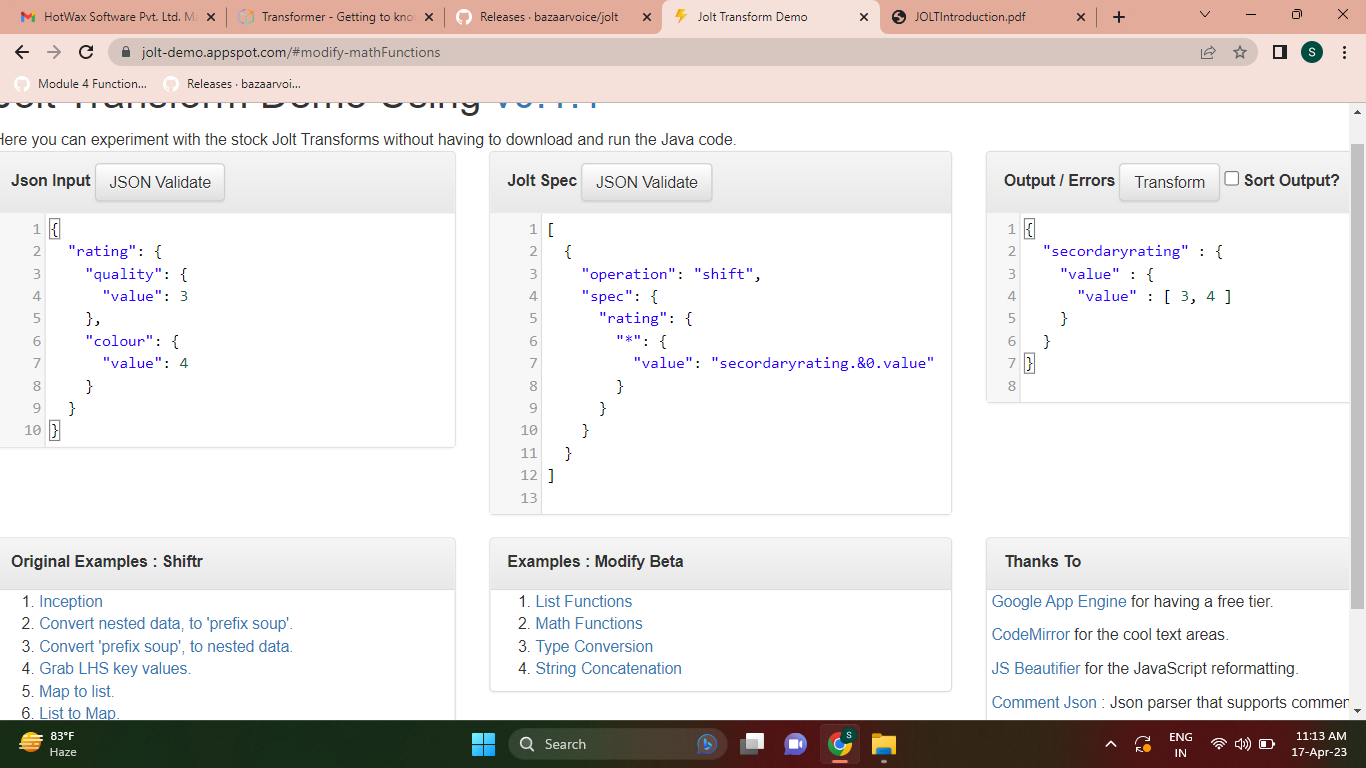
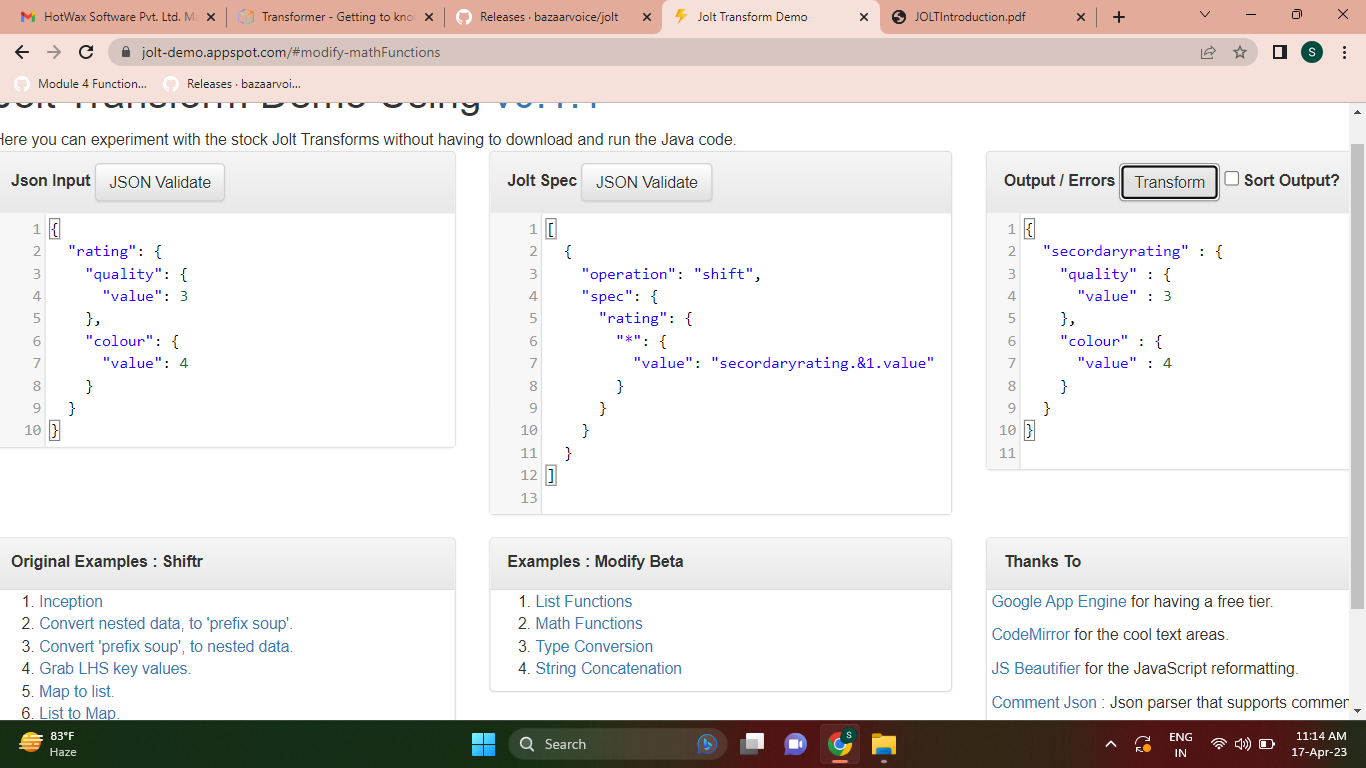
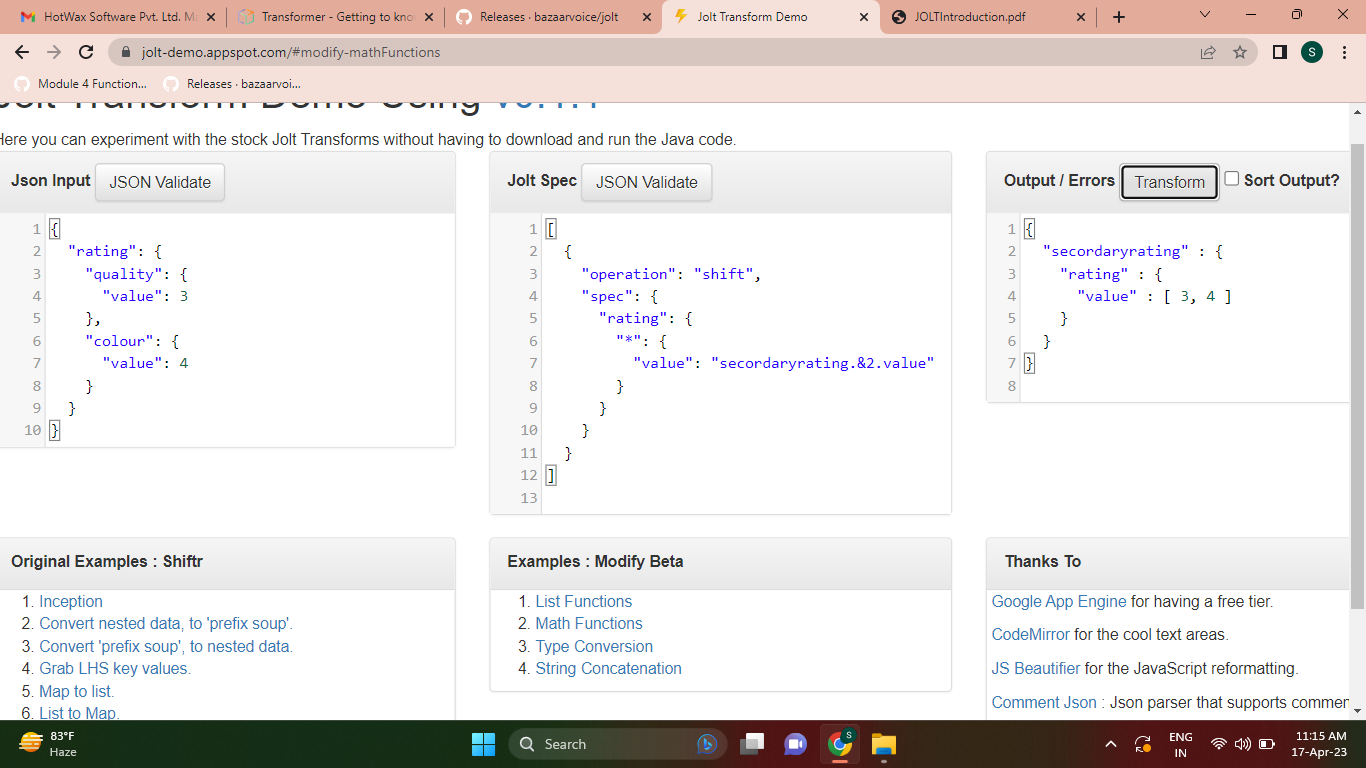
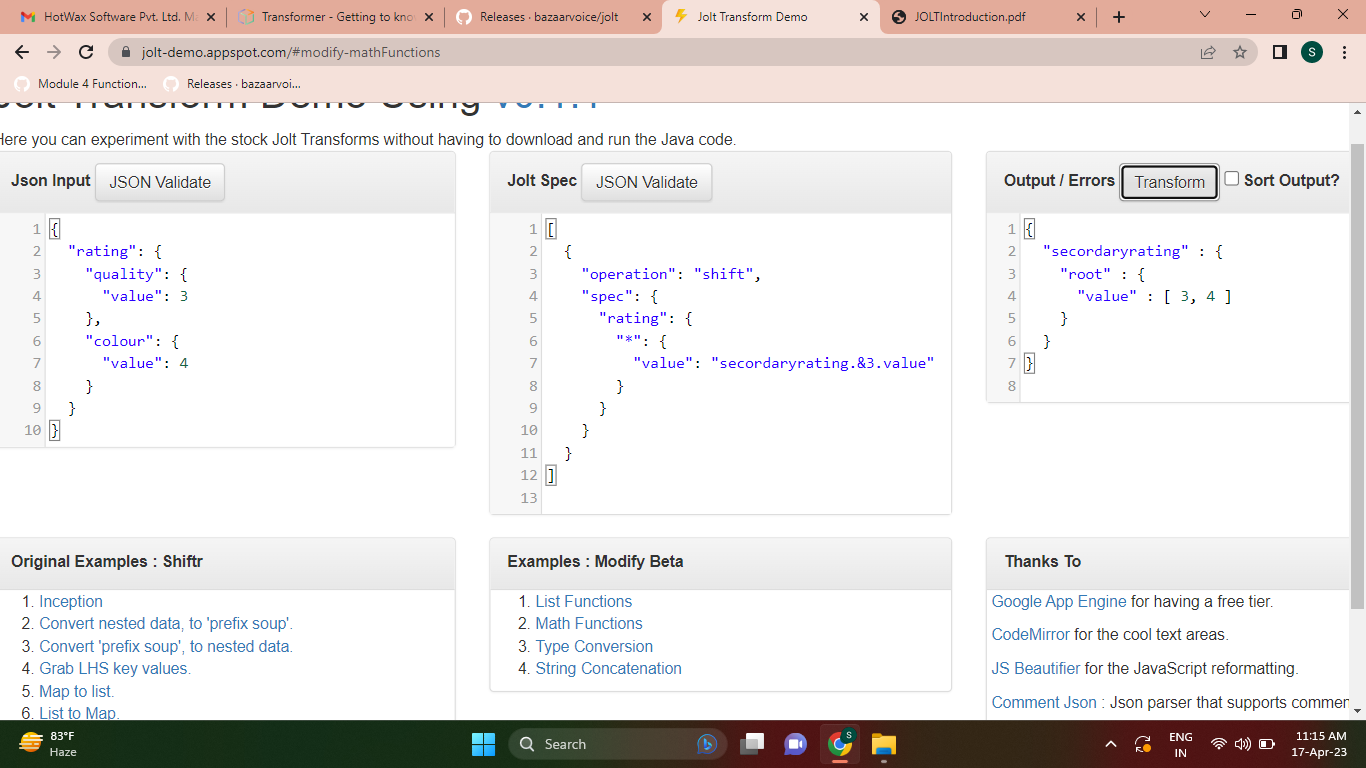
- In this example, the "&" symbol is used to create a reference to the entire input JSON object.
- The reference is then assigned to the "person" key in the output JSON.
- This allows you to access other parts of the input JSON object in later parts of the Jolt specification.
[{
"operation": "shift",
"spec":
{
"firstName": "name.first",
"lastName": "name.last",
"age": "age",
"&": "person"
}
}]
- For example, in the "spec" field for the "firstName" and "lastName" keys,
- the reference "name" is used to access the "first" and "last" properties of the "name" object in the input JSON.
- Using references in Jolt can be very useful for simplifying complex specifications and avoiding repetition.
- However, it's important to use references carefully and avoid circular references,
- as they can cause infinite loops and other issues.
- References all fields and objects in a JSON without changing their name
- If we want to change some names we can do it as well
- Operations: shift, remove, cardinality, modify-default-beta e modify-overwrite-beta
We have an input JSON containing the customer's data:
{
  "name": "Customer Example",
  "email": "cliente-exemplo@email.com",
  "document": "1234567890",
  "birthDate": "10/31/1990",
  "address": "Customer Example Street"
}
And we need this data in an object named "customer", but we need to change the "document" field to a field named "ssn":
{
  "customer": {
    "name": "Customer Example",
    "email": "client-example@email.com",
    "document": "1234567890",
    "birthDate": "10/31/1990",
    "address": "Customer Example Street"
  }
}
Our transformation will be:
[
  {
    "operation": "shift",
    "spec": {
      "*": "customer.&",
      "document": "customer.ssn"
    }
  }
]
- Using the wildcard * next to & means that for each field that * finds, & will keep its name and value.
- This combined use of wildcards is very useful as it allows us to manipulate a JSON without the need to know and declare its content.
- In Jolt, the "*" symbol is used as a wildcard to match any key or index in an array.
- This can be useful when you want to apply a Jolt operation to all keys or elements in an object or array.
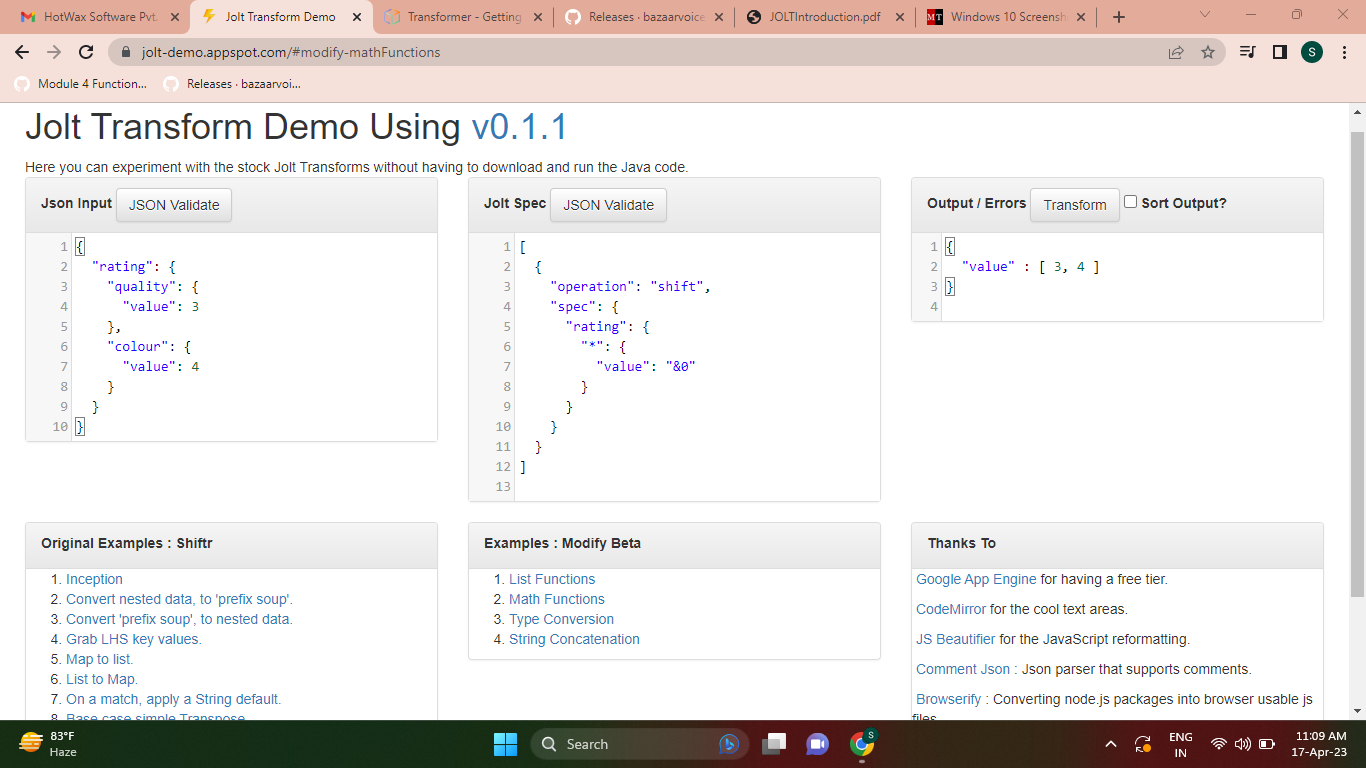
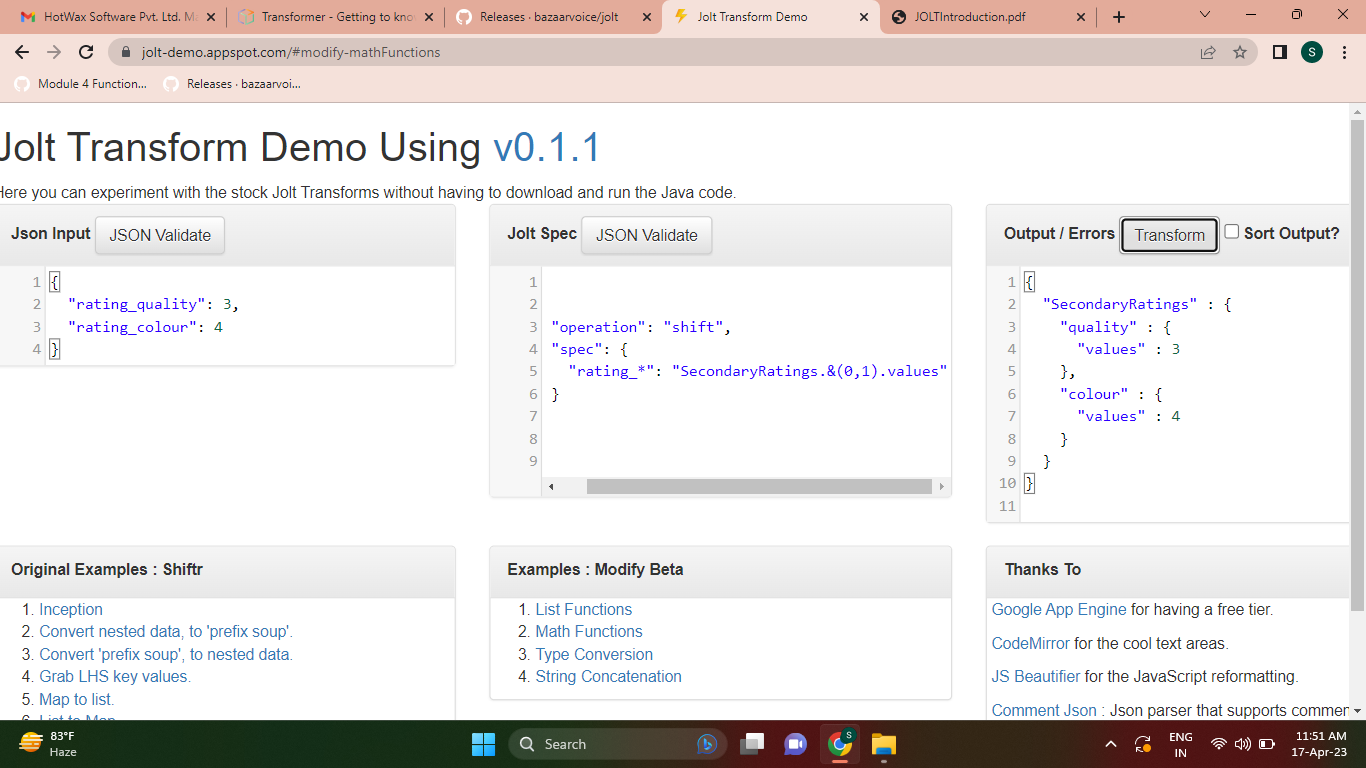
- In Jolt, the @ symbol is also used as part of the syntax for specifying transformations in JSON data.
- The @ wildcard is used in Jolt transformations to match any value in the input JSON data.
- It is used in conjunction with other Jolt transformation specifiers to define the structure and output format of the transformed JSON data.
We have a information in JSON:
{
  "key": "code",
  "value": "123-ABC"
}
And we need to group them into a "product" object, relating the "key" field to the "value" field:
{
  "product": {
    "code": "123-ABC"
  }
}
Our transformation will be:
[
  {
    "operation": "shift",
    "spec": {
      "value": "product.@(1,key)"
    }
  }
]
- In "@ (1, key)" we are taking the value of the "key" field to be used as the name of the field that will receive the value of the "value" field ("@value").
- The use of @ in both LHS and RHS involves declaring the level at which we are seeking information and counting levels from level 1 onwards.
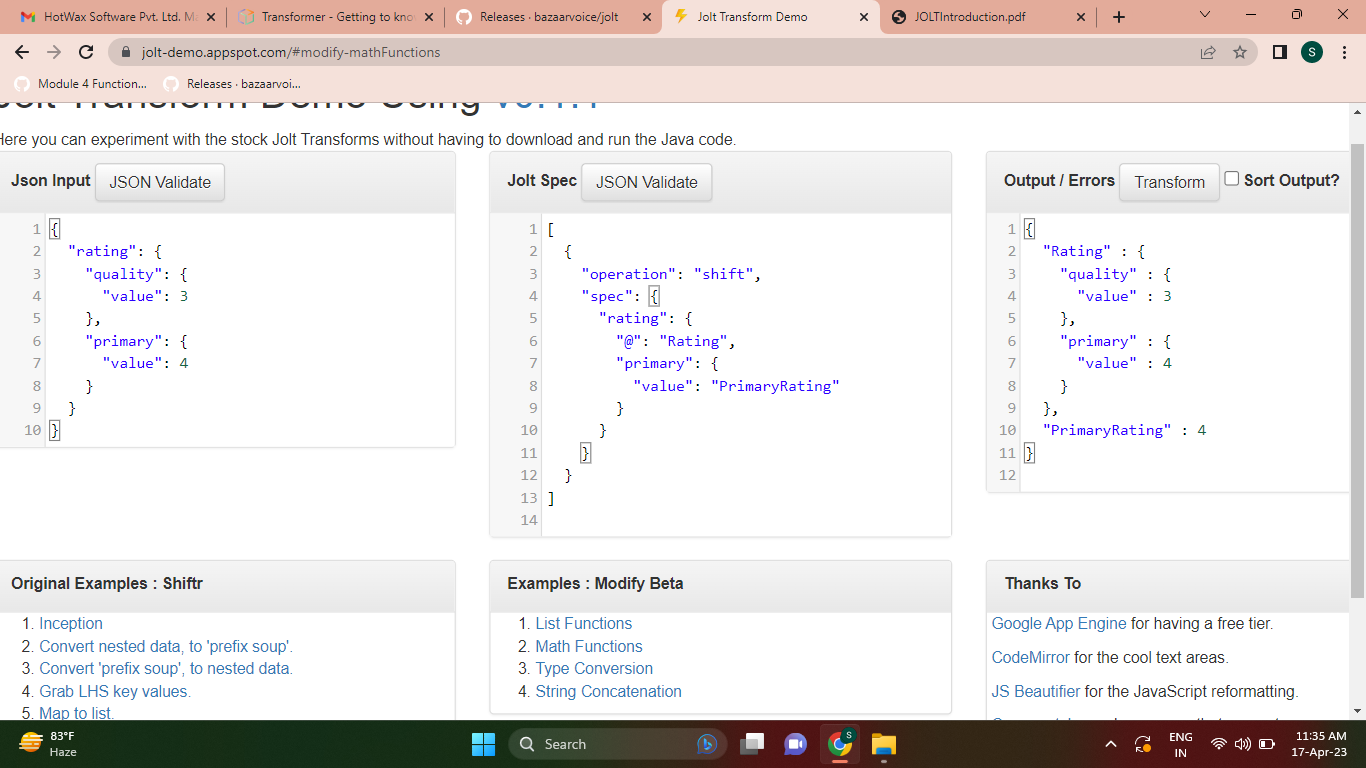
References the name of a field or object contained in the input JSON to be used as the value of a field or object in the output JSON.
We have a input JSON containing product's data:
{
  "product": {
    "name": "Product Example",
    "value": 10,
    "category": "CATEG-1",
    "weight": 25
  }
}
And we need a JSON to know what product information is being provided:
{
  "product": [
    "name",
    "value",
    "category",
    "weight"
  ]
}
Our transformation will be:
[
  {
    "operation": "shift",
    "spec": {
      "product": {
        "*": {
          "$": "product[]"
        }
      }
    }
  }
]
- What we did was select all (*) the fields of the object "product",
- then take the name ($) of each one of them and assign them to a list named "product".
- That way we can get the name of each field and not their values.
- If used in LHS, it has the function of entering values manually in the output JSON.
- In RHS, on the other hand, it is applicable only to create lists and has the function of grouping certain content of the input JSON within the list to be created.
We can use it like this :
[
  {
    "operation": "shift",
    "spec": {
      "product": {
        "*": "product.&",
        "#CATEGORY": "product.category"
      }
    }
  }
]
The value contained after the wildcard # will always be assigned to the field declared in the RHS, which in our case is the "category" field within the "product" object.
The pipe wildcard is represented by the symbol '|', and can be used to combine multiple transformations in a single Jolt specification. Each transformation specified using the pipe wildcard is evaluated in order, from left to right. This means that the output of one transformation can be used as the input for the next. The pipe wildcard is useful when you want to apply multiple transformations to the same data, without having to create multiple intermediate objects. When using the pipe wildcard, it's important to keep the order of the transformations in mind, as this can affect the final output.
Example:
We have an input JSON containing customer data:
{
  "customer": {
    "fullName": "Customer Example",
    "email": "customer-example@email.com"
  }
}
And we need a JSON of the following structure:
{
  "customer": {
    "name": "Customer Example",
    "email": "customer-example@email.com"
  }
}
However, in the input JSON, there is the possibility that the field "fullName" comes with the name "customerName", so we need the transformation to be prepared to recognize the two possibilities:
[
  {
    "operation": "shift",
    "spec": {
      "customer": {
        "fullName|customerName": "customer.nome",
        "email": "customer.&"
      }
    }
  }
]
| Wildcard | Used side |
|---|---|
| '*' | LHS |
| '$' | LHS |
| '|' | LHS |
| '&' | Both |
| '#' | Both |
| '@' | Both |
If we have this input JSON
{
  "fruits": [
    {
      "name": "apple",
      "color": "red"
    },
    {
      "name": "banana",
      "color": "yellow"
    },
    {
      "name": "orange",
      "color": "orange"
    }
  ]
}
If we want this input to be converted like this -
{
  "fruits": [
    {
      "name": [
        "apple",
        "banana",
        "orange"
      ]
    }
  ]
}
Then we will write this spec
[
  {
    "operation": "shift",
    "spec": {
      "fruits": {
        "*": {
          "name": "fruits[#].name"
        }
      }
    }
}]
If we have this input JSON
{
  "fruits": [
    {
      "name": "apple",
      "color": "red"
    },
    {
      "name": "banana",
      "color": "yellow"
    },
    {
      "name": "orange",
      "color": "orange"
    }
  ]
}
And we want to transfer this input as this below output JSON
{
  "apple": {
    "name": "apple",
    "color": "red"
  },
  "banana": {
    "name": "banana",
    "color": "yellow"
  },
  "orange": {
    "name": "orange",
    "color": "orange"
  }
}
Then we will write this following as transformation spec
[
  {
    "operation": "shift",
    "spec": {
      "fruits": {
        "*": {
          "@": "@(0,name)"
        }
      }
    }
}
]
- firstElement(list) - returns first element
- lastElement(list) - returns last element
- elementAt(list,index) - returns element at # index
- sort(list) - sorts the list and returns
- size(list) - returns the size of list
Input.json
{
  "LIST": {
    "array": [
      "c",
      "t",
      "m",
      "a"
    ],
    "stringField": "123"
  }
}
Spec.json
[
  {
    "operation": "modify-overwrite-beta",
    "spec": {
      "LIST": {
        "arrayFirstItem": "=firstElement(@(1,array))",
        "arrayLastItem": "=lastElement(@(1,array))",
        "arrayElement": "=elementAt(@(1,array),2)",
        "fieldToList": "=toList(@(1,stringField))",
        "orderedArray": "=sort(@(1,array))"
      }
    }
  }
]
Output.json
{
  "LIST" : {
    "array" : [ "c", "t", "m", "a" ],
    "stringField" : "123",
    "arrayFirstItem" : "c",
    "arrayLastItem" : "a",
    "fieldToList" : [ "123" ],
    "orderedArray" : [ "a", "c", "m", "t" ]
  }
}
- toString - convert the number to a String
- toInteger - If they don't exist, then fill in default values
- toLong - If they don't exist, then fill in default values.
- toDouble - If they don't exist, then fill in default values.
- toBoolean - convert strings to a boolean, case-insensitive
- size - returns the size
- squashNull - It will look at 1 levels below the object or list
- recursivelySquashNulls - It will look at all levels below the object or list
Input.json
{
  "TYPE": {
    "value": 10.5,
    "double": 92,
    "long": "232",
    "stringBoolean": "true",
    "objectWithNull": {
      "fielWithValue": "ABC",
      "nullField": null
    }
  }
}
Spec.json
[
  {
    "operation": "modify-overwrite-beta",
    "spec": {
      "TYPE": {
        "integerValue": "=toInteger(@(1,value))",
        "booleano": "=toBoolean(@(1,stringBoolean))",
        "stringValue": "=toString(@(1,value))",
        "doubleValue": "=toDouble(@(1,double))",
        "longValue": "=toLong(@(1,long))",
        "stringBoolean": "=size",
        "objectWithNull": "=recursivelySquashNulls"
      }
    }
  }
]
Output.json
{
  "TYPE" : {
    "value" : 10.5,
    "double" : 92,
    "long" : "232",
    "stringBoolean" : 4,
    "objectWithNull" : {
      "fielWithValue" : "ABC"
    },
    "integerValue" : 10,
    "booleano" : true,
    "stringValue" : "10.5",
    "doubleValue" : 92.0,
    "longValue" : 232
  }
}
- min(a,b) - take two arguments and return minimum of them.
- max(a,b) - take two arguments and return maximum of them.
- avg(list) - return average in double.
- abs(value) - return absolute value.
- intSum(list) - return sum of int array.
- intSubtract(a,b) returns the a - b.
- doubleSum(list) - return sum of double array.
- divide(dividend, divisor) - returns double value.
- divideAndRound(no. of decimal places, dividend, divisor)
Input.json
{
  "NUMBER": {
    "array": [
      3,
      5,
      2,
      7,
      1
    ],
    "negativeValue": -100,
    "positiveValue": 50
  }
}
Spec.json
[
  {
    "operation": "modify-overwrite-beta",
    "spec": {
      "NUMBER": {
        "minArray": "=min(@(1,array))",
        "maxArray": "=max(@(1,array))",
        "absoluteValue": "=abs(@(1,negativeValue))",
        "averageArray": "=avg(@(1,array))",
        "sumArray": "=intSum(@(1,array))",
        "subtrArray": "=intSubtract(@(1,positiveValue), 20)",
        "doubleSum": "=doubleSum(@(1,array))",
        "division": "=divide(@(1,positiveValue),2)",
        "divisionRound": "=divideAndRound(3,@(1,positiveValue),3)"
      }
    }
  }
]
Output.json
{
  "NUMBER" : {
    "array" : [ 3, 5, 2, 7, 1 ],
    "negativeValue" : -100,
    "positiveValue" : 50,
    "minArray" : 1,
    "maxArray" : 7,
    "absoluteValue" : 100,
    "averageArray" : 3.6,
    "sumArray" : 18,
    "subtrArray" : 30,
    "doubleSum" : 18.0,
    "division" : 25.0,
    "divisionRound" : 16.667
  }
}
- concat(firstString, “concat by”, lastString) - concatenate two strings.
- toUpper(String) - convert string into uppercase.
- toLower(String) - convert string into lowercase.
- join(“join by”, list) - joins the list by passed argument.
- split(“split by” string) - split the string by passed argument.
- leftPad(string, length, fillBy) - string length is less than length then fills it from left.
- rightPad(string, length, fillBy) - string length is less than length then fills it from right.
- trim(string) - removes extra spaces from beginning and end of string.
- substring(string, start_Index, end_Index-1) - return substring from given indexes.
Input.json
{
  "STRING": {
    "product": "Product A",
    "company": "company a",
    "value": "100",
    "measureWithSpaces": "  10 meters "
  }
}
Spec.json
[
  {
    "operation": "modify-overwrite-beta",
    "spec": {
      "STRING": {
        "product": "=toLower(@(1,product))",
        "company": "=toUpper(@(1,company))",
        "product_company": "=concat(@(1,product),'_',@(1,company))",
        "joinProductCompany": "=join(' - ',@(1,product),@(1,company))",
        "splitProductCompany": "=split('[-]',@(1,joinProductCompany))",
        "substringProduct": "=substring(@(1,product),0,4)",
        "leftvalue": "=leftPad(@(1,value),6,'A')",
        "rightvalue": "=rightPad(@(1,value),8,'B')",
        "measure": "=trim(@(1,measureWithSpaces))"
      }
    }
  }
]
Output.json
{
  "STRING" : {
    "product" : "product a",
    "company" : "COMPANY A",
    "value" : "100",
    "measureWithSpaces" : "  10 meters ",
    "product_company" : "product a_COMPANY A",
    "joinProductCompany" : "product a - COMPANY A",
    "splitProductCompany" : [ "product a ", " COMPANY A" ],
    "substringProduct" : "prod",
    "leftvalue" : "AAA100",
    "rightvalue" : "100BBBBB",
    "measure" : "10 meters"
  }
}