A terminal UI for interactively testing TextFSM and TTP templates against network device output — with live parsed results and auto-generated Python snippets you can drop straight into your automation.
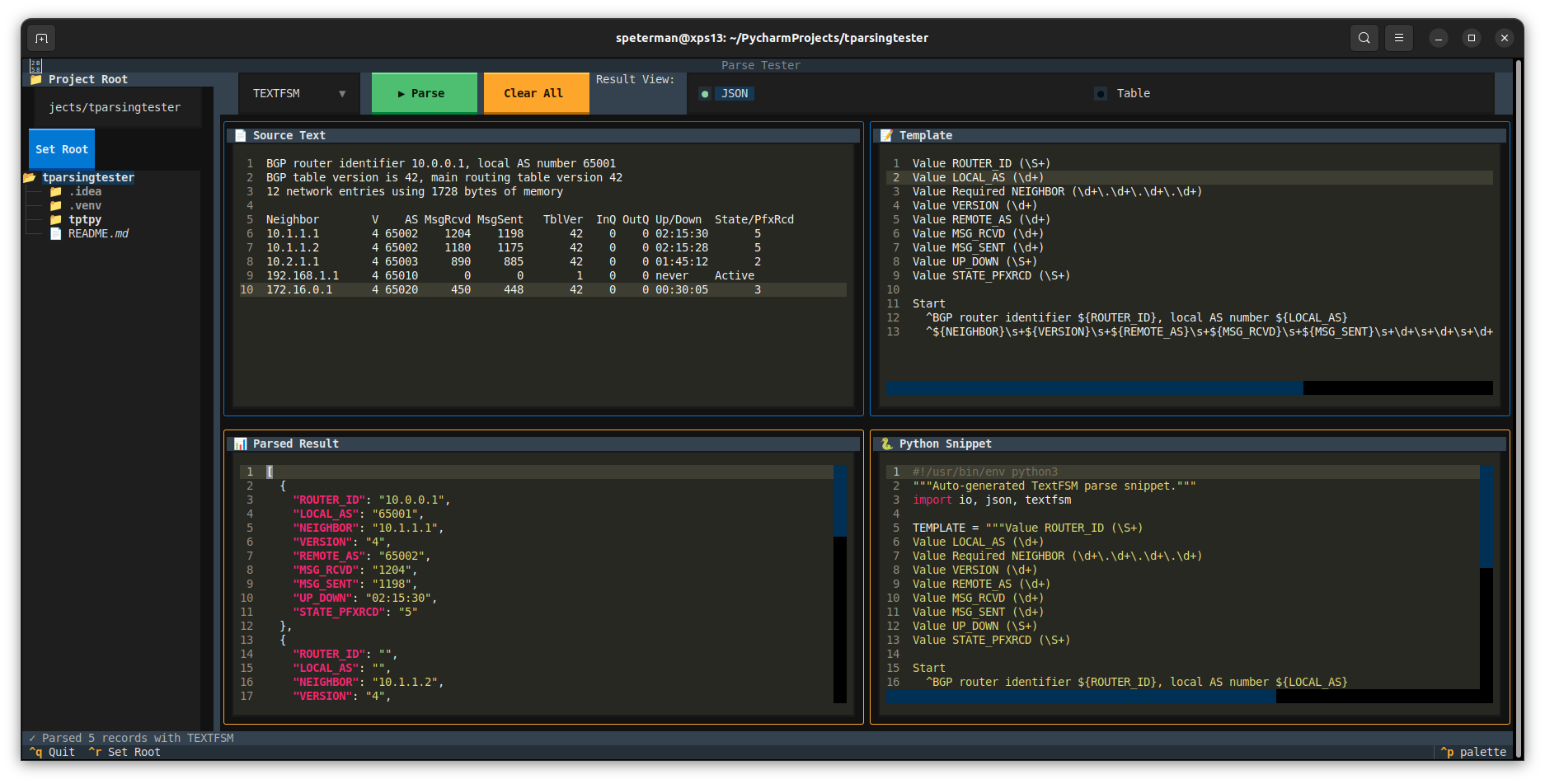
Writing TextFSM and TTP templates is an iterative process: tweak the template, run it, check the output, repeat. Most workflows involve bouncing between a text editor, a Python REPL, and maybe a browser-based tool that doesn't have your files.
tptpy puts everything in one screen:
- Source text (left top) — paste or load device output from the file tree
- Template (right top) — your TextFSM or TTP template
- Parsed result (left bottom) — JSON or table view, updated on each parse
- Python snippet (right bottom) — a self-contained script embedding your source + template, ready to copy
The directory tree auto-routes files: .textfsm, .template, .ttp, and .tpl extensions load into the template pane; everything else loads into the source pane.
pip install tptpygit clone https://github.com/scottpeterman/tptpy.git
cd tptpy
pip install .git clone https://github.com/scottpeterman/tptpy.git
cd tptpy
pip install -e ".[dev]"# Launch in current directory
tptpy
# Launch rooted at a specific project
tptpy ~/templates/bgp
# Or run as a module
python -m tptpy ~/templates/bgp| Key | Action |
|---|---|
Ctrl+P |
Run parse |
Ctrl+S |
Save source pane (directory picker) |
Ctrl+T |
Save template pane (directory picker) |
Ctrl+R |
Focus the root path input |
F2 |
Rename selected file/folder |
Delete |
Delete selected file/folder |
Ctrl+Q |
Quit |
| Parser | Template Style | Best For |
|---|---|---|
| TextFSM | Value declarations + regex state machine | Structured CLI output (show commands) |
| TTP | Template with {{ variable }} placeholders |
Output that closely mirrors the template shape |
- Four-pane layout — source, template, results, and snippet visible simultaneously
- File tree with smart routing — template extensions auto-load to the template pane
- File management — create, rename, and delete files and folders directly from the sidebar
- Save with directory picker — save source or template content to any location in your project tree
- JSON and table views — toggle between structured JSON and a tabular DataTable
- Actionable error messages — parse failures include line numbers, context, and fix hints
- Auto-generated snippets — each successful parse produces a standalone Python script
- Filtered directory tree — shows only text and template files (
.txt,.log,.cfg,.textfsm,.ttp,.yaml,.json, etc.)
- Launch
tptpypointed at a directory containing your show command output and templates - Click a
.txtor.logfile — it loads into Source Text - Click a
.textfsmfile — it loads into Template - Hit
Ctrl+Por click ▶ Parse - Review results in JSON or Table view; grab the Python snippet for your project
- Hit
Ctrl+Sto save source orCtrl+Tto save your template — pick the directory and filename
- Python 3.10+
- Textual — TUI framework
- TextFSM — Google's template-based state machine parser
- TTP — Template Text Parser
tptpy/
├── pyproject.toml
├── README.md
├── screenshots/
│   └── tui1.png
└── tptpy/
    ├── __init__.py
    └── __main__.py
MIT
Scott Peterman — Principal Infrastructure Engineer, network automation toolsmith. Part of a broader toolkit for practical network engineering: github.com/scottpeterman