A comparison tool for displaying the differences between applications in different Git branches




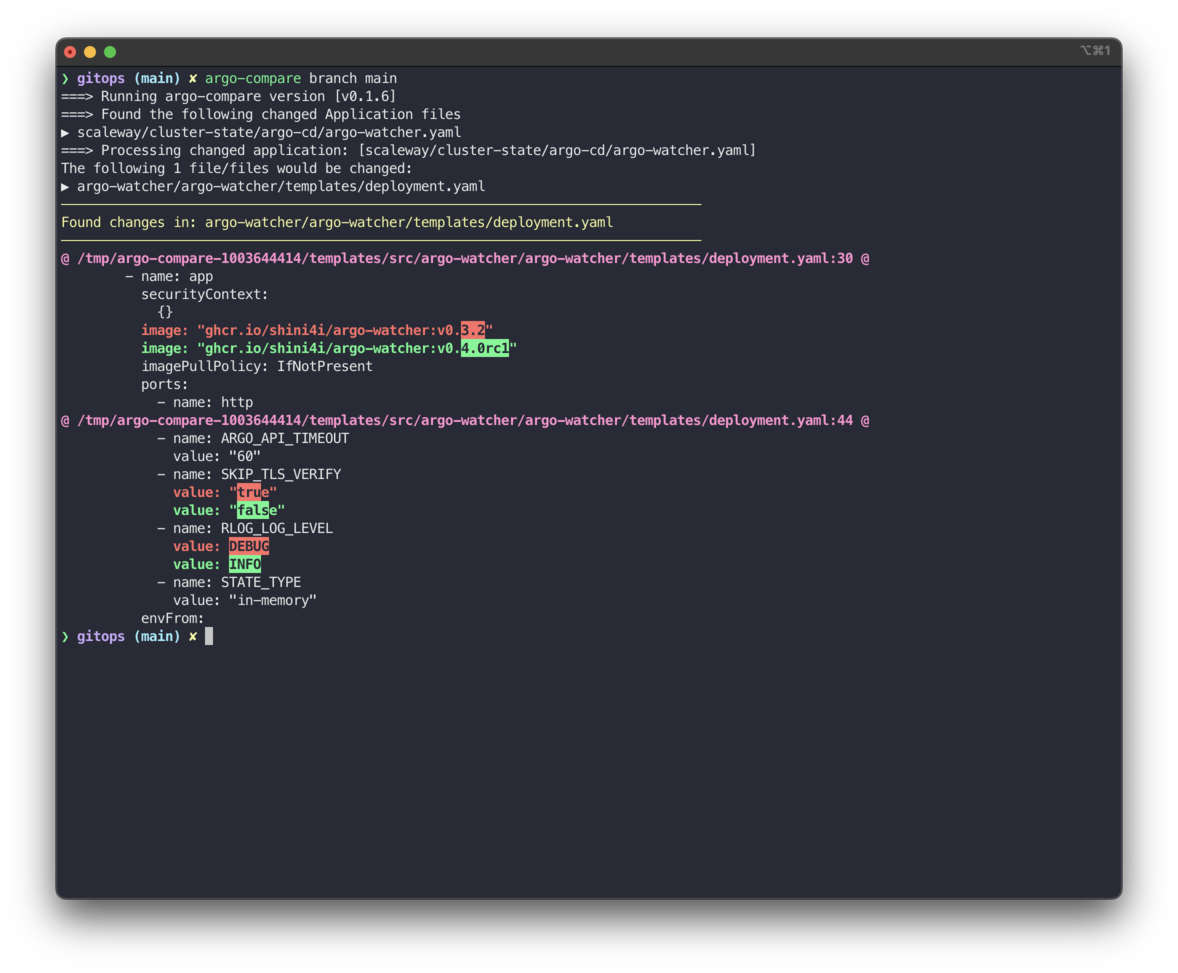
Example output of argo-compare with diff-so-fancy
This tool will show what would be changed in the manifests rendered by helm after changes to the specific Application are merged into the target branch.
Download the binary from the Releases page, or pull the Docker image:
docker pull ghcr.io/shini4i/argo-compare:<version>The simplest usage scenario is to compare all changed files in the current branch with the target branch:
argo-compare branch <target-branch>If you want to compare only specific file, you can use the --file flag:
argo-compare branch <target-branch> --file <file-path>By default, argo-compare will print only changed files content, but if this behavior is not desired, you can use one of the following flags:
# In addition to the changed files, it will print all added manifests
argo-compare branch <target-branch> --print-added-manifests
# In addition to the changed files, it will print all removed manifests
argo-compare branch <target-branch> --print-removed-manifests
# Print all changed, added and removed manifests
argo-compare branch <target-branch> --full-output
To use an external diff tool, you can set EXTERNAL_DIFF_TOOL environment variable. Each file diff will be passed in a pipe to the external tool.
EXTERNAL_DIFF_TOOL=diff-so-fancy argo-compare branch <target-branch>Additionally, you can try this tool using docker container:
docker run -it --mount type=bind,source="$(pwd)",target=/apps --env EXTERNAL_DIFF_TOOL=diff-so-fancy --workdir /apps ghcr.io/shini4i/argo-compare:<version> branch <target-branch> --full-outputTo post the comparison as a comment to a GitLab Merge Request, provide the GitLab provider and credentials either with flags or environment variables:
ARGO_COMPARE_COMMENT_PROVIDER=gitlab \
ARGO_COMPARE_GITLAB_URL=https://gitlab.com \
ARGO_COMPARE_GITLAB_TOKEN=$GITLAB_TOKEN \
ARGO_COMPARE_GITLAB_PROJECT_ID=12345 \
ARGO_COMPARE_GITLAB_MR_IID=10 \
argo-compare branch <target-branch>
Equivalent CLI flags are available:
argo-compare branch <target-branch> \
  --comment-provider gitlab \
  --gitlab-url https://gitlab.com \
  --gitlab-token "$GITLAB_TOKEN" \
  --gitlab-project-id 12345 \
  --gitlab-merge-request-iid 10
When running inside GitLab CI, most settings are detected automatically:
--comment-providerdefaults togitlabwhenGITLAB_CIandCI_MERGE_REQUEST_IIDare present.--gitlab-urlfalls back toCI_SERVER_URL.--gitlab-project-idfalls back toCI_PROJECT_ID.--gitlab-merge-request-iidfalls back toCI_MERGE_REQUEST_IID.--gitlab-tokenfalls back toCI_JOB_TOKENif no explicit token is provided (ensure the token has the necessary scope to post notes).
argo-compare masks the rendered contents of Kubernetes Secret manifests before they reach stdout logs, external diff tools, or merge request comments. Each secret entry is replaced with a deterministic hash placeholder, allowing reviewers to spot that a value changed without exposing the underlying secret material.
Using password protected repositories is a bit more challenging. To make it work, we need to expose JSON as an environment variable. The JSON should contain the following fields:
{
  "url": "https://charts.example.com",
  "username": "username",
  "password": "password"
}
How to properly expose it depends on the specific use case.
A bash example:
export REPO_CREDS_EXAMPLE={\"url\":\"https://charts.example.com\",\"username\":\"username\",\"password\":\"password\"}Where EXAMPLE is an identifier that is not used by the application.
Argo Compare will look for all REPO_CREDS_* environment variables and use them if url will match the repoURL from Application manifest.
Argo Compare supports charts hosted in OCI registries. Following the ArgoCD convention for Helm charts, the repoURL field should contain the bare registry hostname without the oci:// scheme prefix:
source:
  chart: my-chart
  repoURL: registry-1.docker.io/randomcharts
  targetRevision: 15.9.0
For public OCI registries (e.g., ghcr.io), no additional configuration is required.
For private OCI registries, credentials can be provided via REPO_CREDS_* environment variables (same format as above), or resolved automatically in the case of AWS ECR.
Charts hosted in AWS ECR are authenticated automatically using the standard AWS credential chain (environment variables, IRSA, instance profiles, shared config). No manual credential configuration is needed — Argo Compare detects ECR registry URLs, extracts the region, and calls ecr:GetAuthorizationToken to obtain a short-lived token.
Tokens are cached for the duration of the comparison run to avoid redundant API calls when multiple charts are hosted in the same registry.
If AWS credentials are not available (e.g., running locally without AWS access), ECR authentication is skipped gracefully — public ECR charts will still work, and private charts will produce a clear error from Helm.
- First, this tool will check which files are changed compared to the files in the target branch.
- It will get the content of the changed Application files from the target branch.
- It will render manifests using the helm template using source and target branch values.
- It will get rid of helm related labels as they are not important for the comparison. (It can be skipped by providing
--preserve-helm-labelsflag) - As the last step, it will compare rendered manifest from the source and destination branches and print the difference.
- Works only with Applications that are using helm repositories and helm values present in the Application yaml.
Does not support password protected repositories.
- Add support for Application using git as a source of helm chart
- Add support for providing credentials for password protected helm repositories
- Add support for OCI registries (including AWS ECR with automatic authentication)
- Add support for posting diff as a comment to MR (GitLab)
- Add support for posting diff as a comment to PR (GitHub)
Pull requests are welcome. For major changes, please open an issue first to discuss what you would like to change.