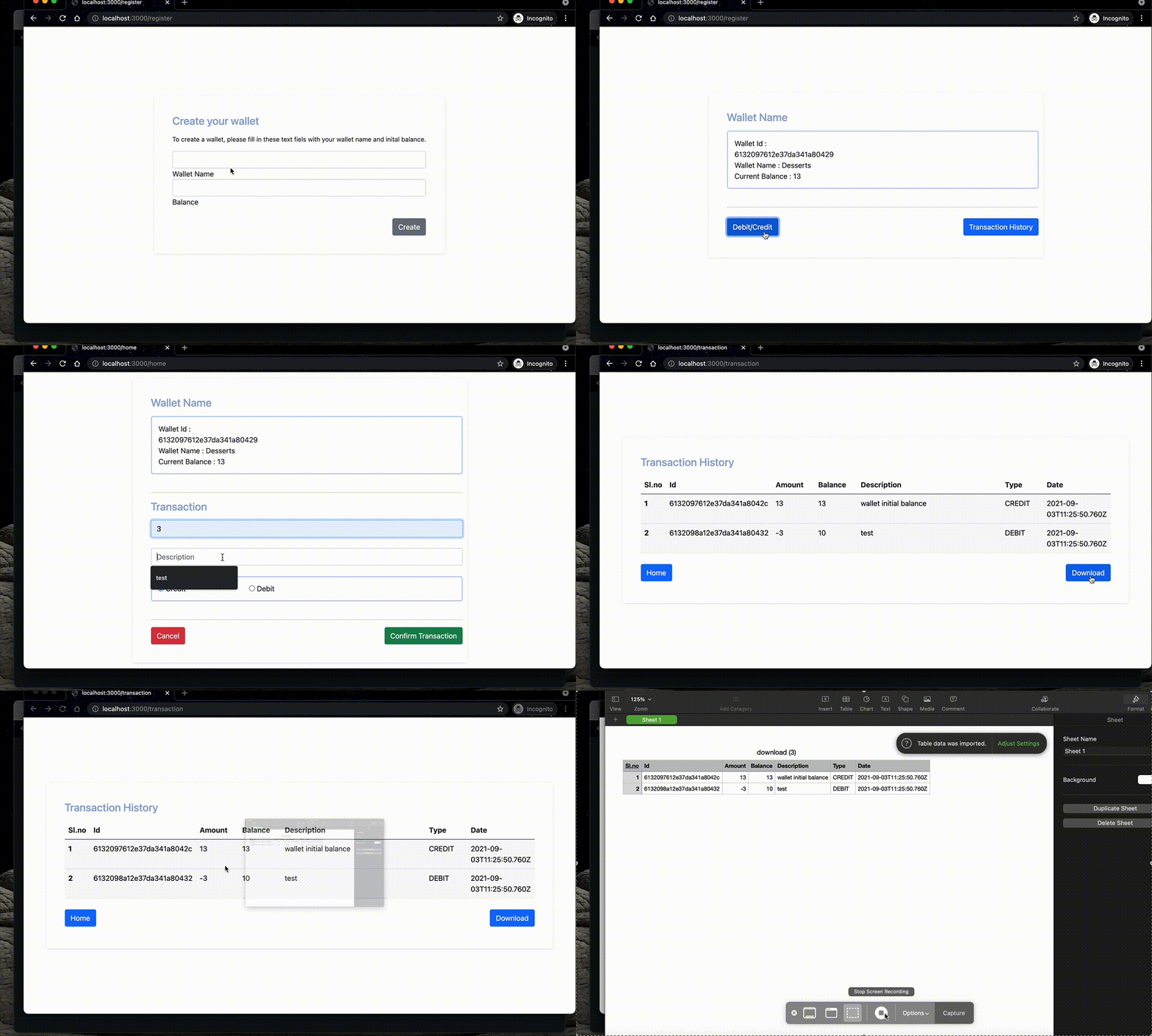
A web application that manages your wallet, perform simple debit/credit queries and support the transactions history. Here's the demo.
.
├── Dockerfile
├── LICENSE
├── README.md
├── app.js
├── bin
│   └── www
├── config.json
├── docker-compose.yml
├── logger
│   └── logger.js
├── models
│   ├── transaction.js
│   └── wallet.js
├── package-lock.json
├── package.json
|__ postman
|   |-- digital_wallet.json
├── public
│   ├── images
│   ├── javascripts
│   │   ├── home.js
│   │   ├── transaction.js
│   │   └── wallet.js
│   └── stylesheets
│       ├── home.css
│       ├── style.css
│       ├── transaction.css
│       └── wallet.css
├── routes
│   ├── transRouter.js
│   └── walletRouter.js
├── utils
│   └── mongodb.js
└── views
    ├── error.ejs
    ├── home.ejs
    ├── javascripts
    │   └── transaction.js
    ├── register.ejs
    └── transaction.ejs
bin/www creates a server and linsten to the defined port, app.js will initalize the middlewares and forwards the request to the routers. The Routers will handle the request and send backs the response accordingly.
The Application can be set up by either using the docker-compose.yml file or by installing all the dependencies into the local machine.
To start the application using Node.js you need Node.js and Mongodb installed on your system. After installation please follow the below steps.
$ npm install     //installing project dependencies
$ node bin/www    //to launch the web server
You can also edit the config.json file to run the application on different port or to give the mongodb connection uri. Default port for the server is 3000 and mongodb connection uri is mongodb://localhost:27017/wallet
To run the application using docker you need Docker and docker-compose installed on your system. Once it is installed following the below steps to run the application.
$ docker-compose up -dThis command will deploy 2 containers which is mongodb and web server. It also exposes the port 3000 for web server and 27017 for mongodb. once the containers start you can access it on http://localhost:3000
Postman collection is present in the directory 'postman/digital_wallet.json' of the repo. It contains the available routes with their request body.