🌐 Live Demo / Project Page: https://shyjun.github.io/git-interactive-rebase-gui-tool/
A clean visual GUI for git rebase -i — reorder, squash, split, rephrase, drop, and refine commit history, plus browse any branch and cherry-pick commits — all with an intuitive interface.
A Python-based Git Interactive Rebase GUI tool to visually manage commit history. Built with PySide6, this tool simplifies the complex process of rewriting Git history with a faster and more visual workflow.
Keywords: git rebase gui, interactive rebase tool, git history editor, git squash commits gui, git cherry-pick gui
- Visual Reordering: Drag and drop commits to reorder your history, or use the Move Commit context-menu actions.
- Interactive Squash: Squash a commit with its neighbor, or multi-select any range of commits to squash into one — with a dedicated dialog and real-time feedback.
- Smart Rephrase: Effortlessly update commit messages without leaving the app.
- Instant Drop: Remove unwanted commits with a single click (with preview).
- Split Commits: Split a commit's changes into multiple commits.
- Split every file change into its own commit
- Split all changes into separate commits
- Move one file's changes out of a commit
- Drop one file's changes from a commit
- Hunk-Level Refinement: Selectively manipulate individual hunks within a commit.
- Keep only selected hunks
- Drop selected hunks
- Move selected hunks to a new commit
- Edit hunks using a lightweight patch editor
- Copy hunk patches to clipboard
- Revert & Reset: Revert individual commits, reset hard to any SHA, or reset HEAD to a commit keeping changes as unstaged (
git reset --mixed). - Archive Safety: Logs important commit SHAs (
START_TIME_HEAD,BEST_COMMITID,Undo), so you can always recover an earlier state — with visible failsafe reset buttons. - Marking: Mark/unmark commits for manual tracking (highlighted in the list).
- Single commit by SHA: Cherry-pick one commit via the Cherry-pick 1 Commit button.
- From the branch browser: Select a commit (or check multiple commits in multi-select mode) in a read-only browse window and inject them into your current branch with Cherry-pick selected commit(s).
- Oldest-first ordering: Multi-commit cherry-picks apply oldest to newest so the history stays linear.
- Pre-flight confirmation: Shows the exact order the selected commits will be applied in (numbered, with commit subjects and target branch).
- Smart failure handling: If a commit fails to apply, you are told why (conflict, already applied/no change, or other) with the conflicting files listed. You then choose:
- Undo entire cherry-pick — reset back to the starting state
- Skip and continue with the next commit
- Stop and handle manually
- Transparent results: After the operation a summary shows how many commits were cherry-picked / skipped / not applied, with every SHA listed. Nothing is left in a half-finished cherry-pick state.
- Live search & filter: Instantly find commits while you type.
- Advanced commit filtering: Search by SHA (short, partial, or full 40-character), commit message, filenames, or diff content (with a per-keystroke debounce and a ≥3 character hint), plus Match Case, Whole Word, and Display Only Matching search options (matching commits are bolded). The Whole Word option always starts off on each app launch.
- Search inside diffs: Press Ctrl+F to search within the currently displayed diff, with match-case, whole-word, and next/previous navigation.
- File-wise diff viewer: Browse commit changes file by file for easier review (renames shown as one
old => newrow). - Consolidated Diff: Set a start commit, then diff any range of history (or from HEAD down to any commit) in one combined view.
- View PR Diff: Open a read-only PR Preview showing the combined branch diff vs its merge-base.
- Browse Branch: Open a separate read-only window for any other branch's history (with dimmed "viewer" styling so you always know it is read-only), then cherry-pick from it.
- Browse File Log: Open a separate read-only window showing the history of a single file, via Browse File Log… in the Repo menu or Browse file log in the file-wise view's right-click menu. History follows renames (
git log --follow), and the diff pane is scoped to that file. - Find Merge-base: Compute the merge-base between the current branch and any other branch, with one-click Copy SHA to clipboard (Repo menu → Find Merge-base…).
- Non-modal viewer windows: View Commit, file-wise view, PR Diff, and consolidated-diff windows stay open while you keep using the main window — switch freely between them without closing the viewer.
- Rebase onto: One-click
git rebase main/git rebase master, or rebase onto any branch/SHA you type. - Origin helpers:
git fetch,git reset --hard origin/<branch>, andgit push --force. - Stash management: Unstaged changes at startup can be stashed, committed (per file or all at once), amended into HEAD, or discarded. The app-created stash is tracked and offered for pop at exit, with conflict warnings before doing so.
- Commit Selectively: Instead of committing everything at once, choose exactly what to commit from the unstaged-changes dialog:
- Per-file checkboxes with
+N -Mstats; the bottom pane previews the combined diff of the checked files, with separator lines between files (like the main diff pane) - Commit Selected Files — a single commit containing only the checked files
- commit --amend selected files — amend only the checked files into the HEAD commit, with the message pre-filled from HEAD (editable)
- git add -p — interactive hunk-by-hunk selection (all checked files in one view) followed by
git commitorgit commit --amend - Unchecked files stay completely untouched, and cancelling at any point leaves the repository unchanged
- Per-file checkboxes with
- Adaptive Themes: Toggle between a refined Dark Theme (VS Code-inspired charcoal palette) and a clean Light Theme.
- Global consistency: Every button, scrollbar, and dialog follows the chosen theme.
- Persistent settings: Theme, font size, and UI preferences are saved across sessions.
- Per-window font zoom: Adjust the code font-size with the +/- (zoom) buttons in the status bar.
- Visual feedback: Instant "Copied" notifications for clipboard actions (SHA, message, or both).
- Resizable dialogs: Long result/confirmation dialogs can be resized to read all the details.
| Shortcut | Action |
|---|---|
/ |
Focus the search bar |
Esc |
Clear search / close dialog |
Ctrl+F |
Search inside the diff viewer |
Ctrl+Q |
Exit application |
Ctrl+Z |
Undo last operation (disabled while editing text) |
F5 |
Refresh / rescan commit history |
Right-clicking any commit gives you quick access to:
- Mark / unmark a commit, view the commit (full or file-wise)
- Reset hard to a commit, reset HEAD to here (keep changes), set the BEST commit, revert
- Rephrase, drop
- Squash commits submenu — squash with above/below, or multi-select any range to squash
- Move Commit submenu — move up/down or drag to reorder
- Split Commit submenu — split, per-file split, move file out, drop file, refine hunks
- Consolidated Diff submenu — set start commit, diff to here, or diff HEAD to here
- Copy SHA / message / both to clipboard
See the Screenshots & Feature Guide for visual documentation of all features.
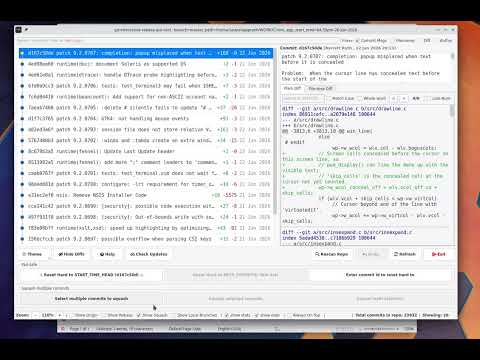
Interactive rebasing in Git is powerful, but repeatedly editing raw rebase todo files can become tedious during commit cleanup workflows.
This tool is designed as a lightweight visual helper around Git interactive rebase, especially useful while cleaning up a feature branch before raising a PR.
Useful when a commit accidentally contains mixed changes — for example: feature work + debug code, code + documentation, or unrelated edits inside the same file.
-
Uses native Git under the hood
All operations are executed using standard Git commands. No custom Git implementation or hidden logic.
This also means that when Git itself improves or adds new capabilities, the tool automatically benefits from them.
-
Lightweight setup
No heavy installation or large Git client required.
-
Focused specifically on interactive rebase
Instead of being a full Git client, the tool focuses only on commit history cleanup workflows:
- reorder/squash/split/rephrase/drop commits
- cherry-pick commits between branches
- refine file changes
- move changes to new commits
- clean up history before PR creation
Key Strength: Uses native Git under the hood — all operations are executed using standard Git commands.
- Core: Python 3.x
- GUI Framework: PySide6 (Qt)
- Styling: Global QSS with dynamic color mapping.
- Git Integration: Direct subprocess communication with the Git CLI.
- Persistence:
QSettingsfor storing theme, font size, and UI preferences across sessions.
- Python 3.10+
- Git CLI installed and available in PATH (
git --versionshould work). PySide6installed (pip install PySide6).
pip install git+https://github.com/shyjun/git-interactive-rebase-gui-tool.gitThen run:
git_interactive_rebaseIf you prefer to run directly from source:
python3 git_interactive_rebase.pyYou can pass optional arguments when running the script:
Run from a specific commit:
python3 git_interactive_rebase.py <commit-sha>Start in read-only viewer mode (disabled history-modifying operations):
python3 git_interactive_rebase.py --viewer-modeSpecify a different repository location:
python3 git_interactive_rebase.py -C /path/to/repoIf no start commit is given, the tool automatically detects your branch base and shows the commits since that point; otherwise it falls back to a recent history window.
This project is actively under development, with new features and improvements added regularly.
To get the latest enhancements and fixes, update your installation from time to time using the steps below.
pip uninstall git-interactive-rebase-gui-tool
pip install git+https://github.com/shyjun/git-interactive-rebase-gui-tool.gitgit pullYou can also press Check Updates in the app to compare the running version against the remote.
This project is licensed under the MIT License.
⭐ If this tool helps you, consider starring the repository!