This repository contains a production-grade End-to-End test automation framework built with Cypress to validate the Opex Consulting website.
The framework is designed and structured to mirror real enterprise QA automation practices, with strong emphasis on CI-driven execution, reporting, analytics, and security validation.
The framework validates:
✔ End-to-end navigation flows ✔ UI content and layout consistency ✔ Forms and user submissions ✔ Cross-domain routing and external redirects ✔ Security vulnerabilities (XSS & malicious inputs) ✔ Automated reporting and metrics generation ✔ CI execution with GitHub Actions ✔ Artifact generation (HTML reports, JSON data, screenshots)
| Tool | Purpose |
|---|---|
| Cypress | UI Test Automation |
| JavaScript | Test Development |
| Mochawesome | Test Reporting |
| Node.js | Runtime Environment |
| GitHub Actions | CI/CD Pipeline |
| Git | Version Control |
OpexTest__Automation
│
├─ .github/
│  └─ workflows/
│     └─ cypress.yml
│
├─ cypress/
│  ├─ e2e/
│  │  └─ landingPage.cy.js
│  ├─ fixtures/
│  │  └─ landingPage.json
│  ├─ reports/
│  │  ├─ Bug_REPORT_R1/
│  │  └─ screenshots/
│  ├─ screenshots/
│  │  └─ landingPage.cy.js/
│  └─ support/
│     ├─ page_object_model/
│     │  └─ landingPageObject.js
│     ├─ commands.js
│     └─ e2e.js
│
├─ scripts/
│  ├─ copyScreenshots.js
│  ├─ generateMetrics.js
│  ├─ injectText.js
│  └─ renderCharts.js
│
├─ cypress.config.js
├─ package.json
├─ package-lock.json
├─ OPEX_LANDING_PAGE_Automation_BUG_REPORT.pdf
└─ README.md
• Industries • Products • Services • Events • Who We Are
• Contact Us • Enrollment • Footer subscription
• XSS payload injection • HTML injection • SQL-like payloads • Input validation
• Industry Based Training • Impact Based Training (Academy redirects)
Download:
https://nodejs.org
Verify:
node -v
npm -vgit clone https://github.com/sphinx010/OpexConsulting_LP_Automated_Suite-.git
cd OpexConsulting_LP_Automated_Suite-npm installnpx cypress opennpm run cy:runnpm run test:cinpm run report:mergenpm run report:generatenpm run report:customizenpm run report:copy:screenshotsnpm run clean:reportsThis workflow:
✔ Cleans previous reports ✔ Executes tests ✔ Merges JSON output ✔ Generates HTML reports ✔ Injects custom branding ✔ Attaches screenshots to reports
Automatically updated by GitHub Actions after each workflow execution.
Analytics (Last 30 Runs)
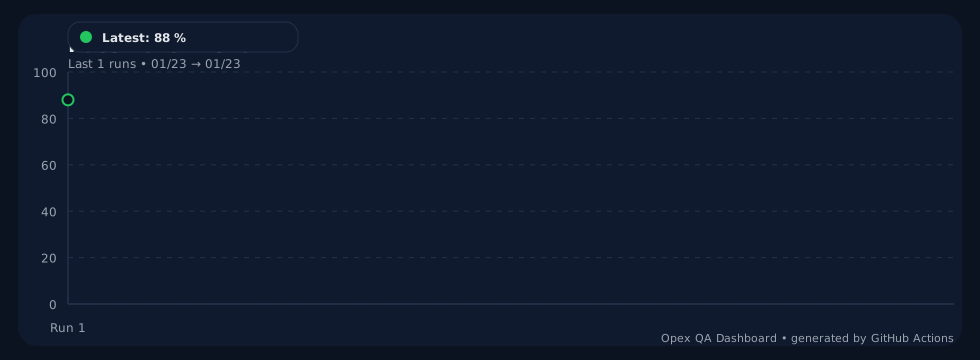
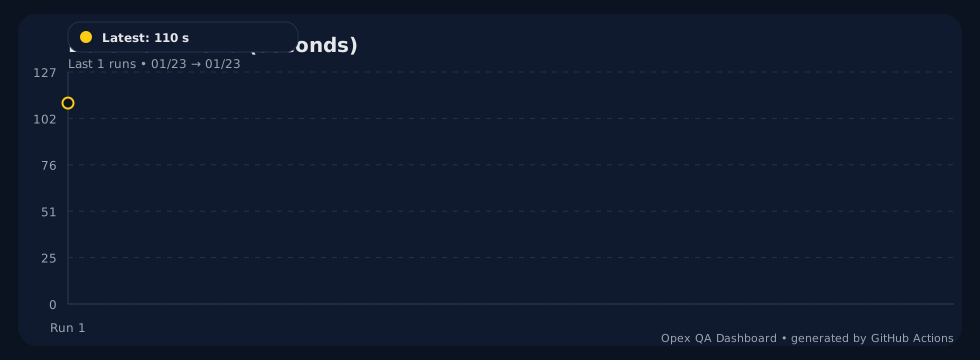
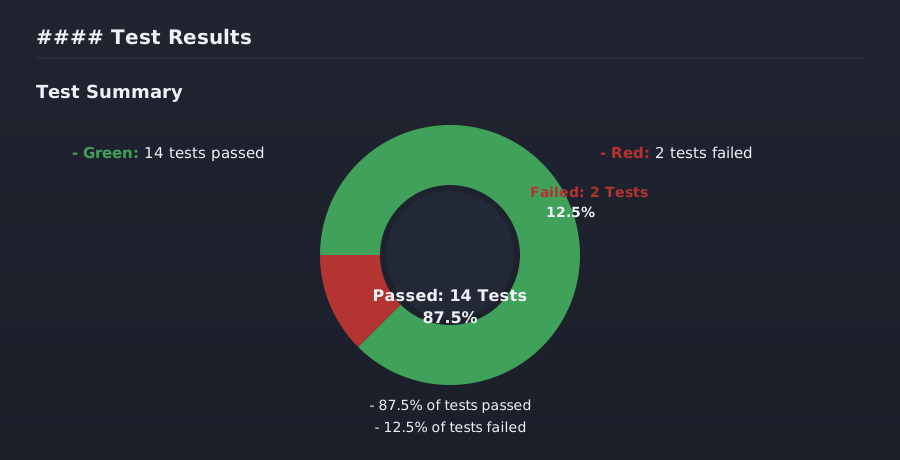
➡ Live Analytics App (upload debug.json for interactive insights):
https://opexqaanalytics.netlify.app/
After execution, the following artifacts are available under:
cypress/reports
• HTML test report • JSON metrics data • Screenshots on failure • Live analytics rendered directly in the README
A custom banner is dynamically injected into the reports, including:
✔ Project name ✔ Engineer name ✔ Environment
Script responsible:
scripts/injectText.js
| Type | Location |
|---|---|
| Screenshots | cypress/screenshots/ |
| Videos | cypress/videos/ |
Screenshots are automatically captured on test failures.
The pipeline runs on:
• Push events • Pull requests
- Install dependencies
- Execute Cypress tests
- Generate reports
- Upload artifacts
Artifacts available for download:
• HTML report • Screenshots
Path:
GitHub → Actions → Workflow Run → Artifacts
| Name | Purpose |
|---|---|
| mochawesome-report | HTML test report |
| screenshots | Failure evidence |
Developer
   |
   v
GitHub Push
   |
   v
GitHub Actions
   |
   v
Node + Cypress
   |
   v
Browser Automation
   |
   v
README Live Analytics (per run)
   |
   v
Artifacts (HTML, Screenshots)
✔ Pass / Fail rate ✔ Execution time ✔ Regression stability ✔ Coverage growth
The framework validates against:
• Script injection attacks • HTML injection • Malicious payloads • Input sanitization
npm run cy:run
npm run test:ci
npm run clean:reports
npm run report:merge
npm run report:generate
npm run report:customize
npm run report:copy:screenshotsnpm run clean:reportsAyooluwa Paul Obembe QA Automation Engineer
• Expanded test analytics dashboard • Slack notifications • Email reports • Dockerized execution • Parallel test execution • Cloud execution grids
This framework is:
✔ Scalable ✔ CI-ready ✔ Enterprise-grade ✔ Easy to extend