A labelling agent for Swarm Node, provide node labels for running stacks/services on a given node.
The agent is a simple service that listens for events on the Docker Engine API to detect when a new service is created or updated. When a new service is created or updated, the agent detech the node where the service is running and apply the labels to the node.
These labels can be use with constraints in the service definition to run the service on a specific node or as a dependency service to run on the same node.
Example:
We deploy a stack with two services, ingress and frontend. We want the frontend service to run on the same node as the ingress service. We can use the following labels:
# stack.namespace=myapp
services:
  # The ingress service
  ingress:
    image: nginx
    ports:
      - "80:80"
      - "443:443"
    networks:
      ingress:
  # The frontend service should run on the same node as the ingress service
  frontend:
    image: nginx
    networks:
      ingress:
    deploy:
      placement:
        constraints:
          - node.labels.services.myapp_ingress == true
networks:
  ingress:
Promstack example:
$ docker node inspect self[
{
"ID": "ro06pl57tb2ghdxtl7oqvvn4x",
# ...
"Spec": {
"Labels": {
"services.promstack_blackbox_exporter": "true",
"services.promstack_cadvisor": "true",
"services.promstack_grafana": "true",
"services.promstack_grafana_dashboard_provider": "true",
"services.promstack_grafana_provisioning_config_reloader": "true",
"services.promstack_grafana_provisioning_dashboard_provider": "true",
"services.promstack_grafana_provisioning_datasource_provider": "true",
"services.promstack_node_exporter": "true",
"services.promstack_prometheus": "true",
"services.promstack_prometheus_config_provider": "true",
"services.promstack_prometheus_config_reloader": "true",
"services.promstack_prometheus_server": "true",
"services.promstack_pushgateway": "true",
"services.swarmlibs_node_labelling_agent": "true",
"stacks.promstack": "true",
"stacks.swarmlibs": "true",
},
"Role": "manager",
"Availability": "active"
},
# ...
}
]Please see the swarmlibs/swarmlibs repository for examples on how to deploy the agent.
usage: node-metadata-agent [<flags>]

Flags:
  --[no-]help                   Show context-sensitive help (also try --help-long and --help-man).
  --stack.namespace=""          Filter by stack namespace
  --refresh.interval=15s        refresh interval
  --[no-]preserve-service-name  Preserve service name
  --[no-]version                Prints current version.
--[no-]short-version Print just the version number.Swarm services provide a few different ways for you to control scale and placement of services on different nodes.
-
You can specify whether the service needs to run a specific number of replicas or should run globally on every worker node. See Replicated or global services.
-
You can configure the service's CPU or memory requirements, and the service only runs on nodes which can meet those requirements.
-
Placement constraints let you configure the service to run only on nodes with specific (arbitrary) metadata set, and cause the deployment to fail if appropriate nodes do not exist. For instance, you can specify that your service should only run on nodes where an arbitrary label
pci_compliantis set totrue. -
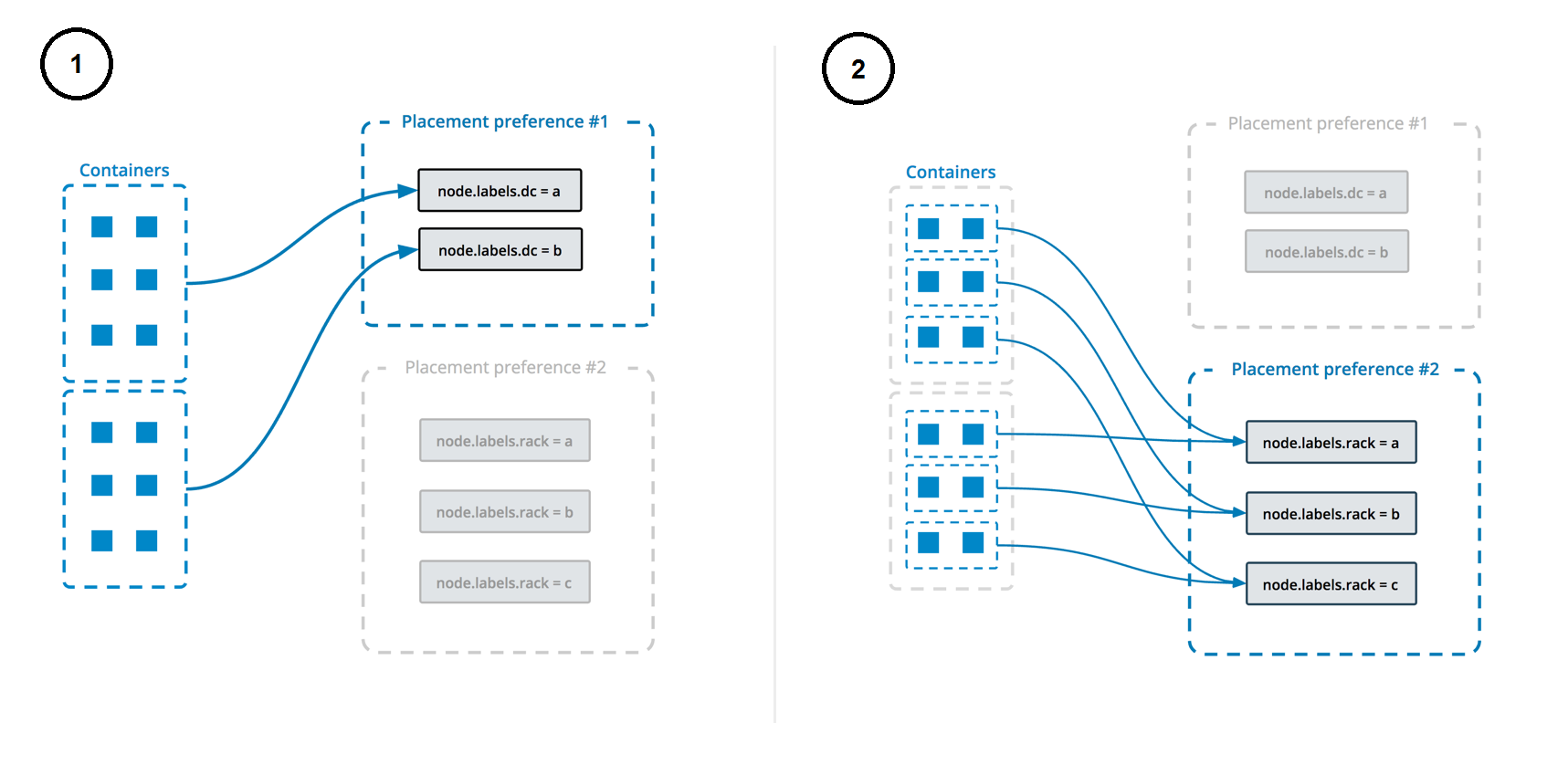
Placement preferences let you apply an arbitrary label with a range of values to each node, and spread your service's tasks across those nodes using an algorithm. Currently, the only supported algorithm is spread, which tries to place them evenly. For instance, if you label each node with a label rack which has a value from 1-10, then specify a placement preference keyed on rack, then service tasks are placed as evenly as possible across all nodes with the label rack, after taking other placement constraints, placement preferences, and other node-specific limitations into account.
Unlike constraints, placement preferences are best-effort, and a service does not fail to deploy if no nodes can satisfy the preference. If you specify a placement preference for a service, nodes that match that preference are ranked higher when the swarm managers decide which nodes should run the service tasks. Other factors, such as high availability of the service, also factor into which nodes are scheduled to run service tasks. For example, if you have N nodes with the rack label (and then some others), and your service is configured to run N+1 replicas, the +1 is scheduled on a node that doesn't already have the service on it if there is one, regardless of whether that node has the rack label or not.
This diagram illustrates how placement preferences work:
See Control service placement for more information.
Licensed under MIT.