



A Streamlit custom component that provides enhanced functionality over the standard streamlit.multiselect. Users can enter free-form text which will appear as separate keyword chips.
Author: Tyler House (@tahouse)
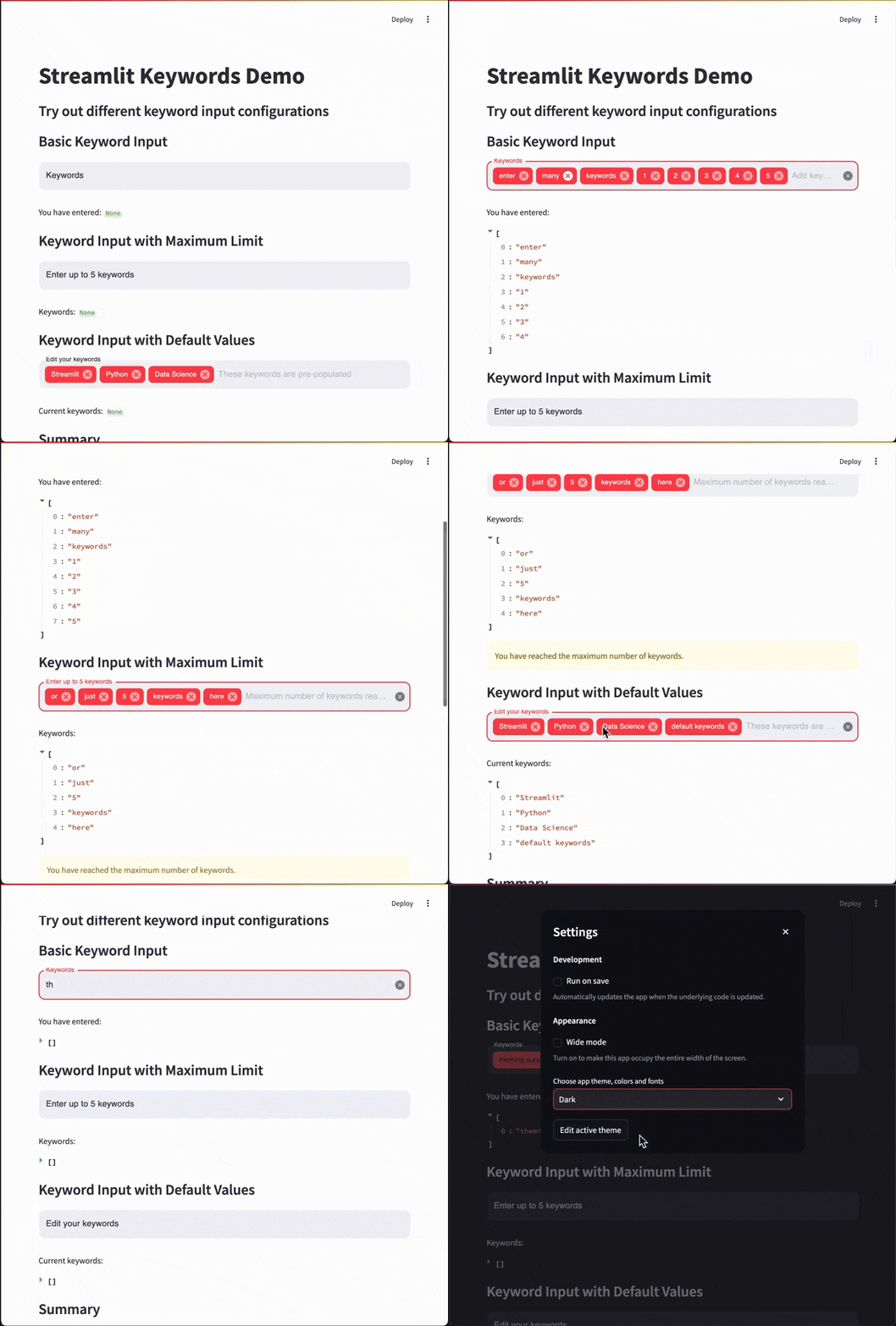
- 🏷️ Keyword Entry: Input multiple keywords as chips/tags.
- 📝 Free-Form Text: Users can enter free-form text, which will be tokenized into individual keywords.
- 🎨 Customizable: Customize the label, placeholder text, and set a maximum number of keywords.
- 🔢 Keyword Limit: Optionally limit the maximum number of keywords.
- 🎨 Theme Integration: Automatic integration with Streamlit's theming (dark/light modes).
- 🖥️ Seamless Integration: Integrates seamlessly with Streamlit apps.
- 🗑️ Keyword Removal: Easily remove keywords by clicking the remove icon.
pip install streamlit-keywordsimport streamlit as st
from streamlit_keywords import keywords_input
# Create a keyword input
keywords = keywords_input(
value=["example", "keywords"],
label="Enter Keywords",
text="Type a keyword and press Enter",
max_keywords=5,
key="unique_keywords_input"
)
# Display the entered keywords
st.write("Entered keywords:", keywords)Here are some usage patterns to help you integrate streamlit_keywords into your Streamlit app. See examples/example.py for more usage examples.
import streamlit as st
from streamlit_keywords import keywords_input

st.title("Keyword Input Example")

keywords = keywords_input(
    label="Keywords",
    text="Add keywords and press Enter",
    key="basic_keyword_input"
)

st.write("You have entered:", keywords)import streamlit as st
from streamlit_keywords import keywords_input
keywords = keywords_input(
label="Enter up to 5 keywords",
max_keywords=5,
key="keyword_input_max5"
)
st.write("Keywords:", keywords)
if keywords and len(keywords) >= 5:
st.warning("You have reached the maximum number of keywords.")import streamlit as st
from streamlit_keywords import keywords_input
initial_keywords = ["Streamlit", "Python", "Data Science"]
keywords = keywords_input(
value=initial_keywords,
label="Edit your keywords",
key="keyword_input_with_defaults"
)
st.write("Current keywords:", keywords)Display a Streamlit component for entering keywords.
Signature:
def keywords_input(
    value: list = [],
    label: str = "Keywords Input",
    text: str = "Type a keyword and press Enter",
    max_keywords: Optional[int] = None,
    key: Optional[str] = None,
) -> List[str]:
Parameters:
-
value(List[str], optional):
Initial list of keywords. Defaults to[]. -
label(str, optional):
Label for the input component. Defaults to"Keywords Input". -
text(str, optional):
Instructions or placeholder text displayed in the input field. Defaults to"Type a keyword and press Enter". -
max_keywords(Optional[int], optional):
Maximum number of keywords allowed. IfNone, there is no limit. Defaults toNone. -
key(str, optional):
An optional string to use as the unique key for the widget. It's recommended to assign a unique key to prevent the component from remounting on script reruns. Defaults toNone.
Returns:
List[str]:
A list of entered keywords.
This repository uses the Streamlit Component template system. If you want to modify or develop the component, follow these steps.
- Python: Version 3.7 or newer.
- Node.js and npm: Required for frontend development.
Clone the repository and install the development dependencies.
# Clone the repository
git clone https://github.com/tahouse/streamlit-keywords.git
cd streamlit-keywords

# Install Python dependencies
pip install -e ".[devel]"The frontend of this component is built using React and TypeScript, leveraging Material-UI components.
Navigate to the streamlit_keywords/frontend directory and install the dependencies as specified in package.json.
cd streamlit_keywords/frontend
npm install
package.json dependencies:
{
  "dependencies": {
    "@emotion/react": "^11.13.3",
    "@emotion/styled": "^11.13.0",
    "@mui/icons-material": "^6.1.6",
    "@mui/material": "^6.1.6",
    "react": "^17.0.2",
    "react-dom": "^17.0.2",
    "streamlit-component-lib": "^2.0.0"
  },
  "devDependencies": {
    "@babel/plugin-proposal-private-property-in-object": "^7.21.11",
    "@types/node": "^22.0.0",
    "@types/react": "^17.0.2",
    "@types/react-dom": "^17.0.2",
    "node": "^22.0.0",
    "react-scripts": "^5.0.1",
    "typescript": "^4.2.0"
  }
}To run the component in development mode with live reloading:
-
Start the frontend development server:
npm start
This will start the React development server.
-
Set the
_RELEASEflag:Ensure that
_RELEASE = Falseis set in your__init__.py. This tells the component to use the local development server. -
Run your Streamlit app:
In a separate terminal, navigate back to the root directory and run your Streamlit app.
cd ../../
streamlit run your_app.py
When you're ready to build the component for production:
-
Build the frontend:
npm run build
This will generate the production-ready frontend assets.
-
Update
_RELEASEflag:Set
_RELEASE = Truein__init__.py._RELEASE = True
-
Your component is now ready:
The component is now ready for use in production environments.
This project is licensed under the Apache License 2.0 - see the LICENSE file for details.
This project draws inspiration from multiple sources:
-
Streamlit Multiselect: The standard Streamlit library's multiselect component served as initial inspiration, though this project extends functionality to allow free text entry.
-
streamlit-tags: Special thanks to Gagan Bhatia (@gagan3012) for streamlit-tags, which was what I initially used in my application. This project addresses mobile usability limitations in streamlit-tags where the enter button functioned only as a tab key.
-
Material UI: This component is built using Material UI's Autocomplete component, which provided the foundation for the user interface.
The decision to build streamlit-keywords came from a need for a modern, mobile-friendly keyword input component with up-to-date dependencies, improved mobile user experience, and theming that closely matches Streamlit's native multiselect component.