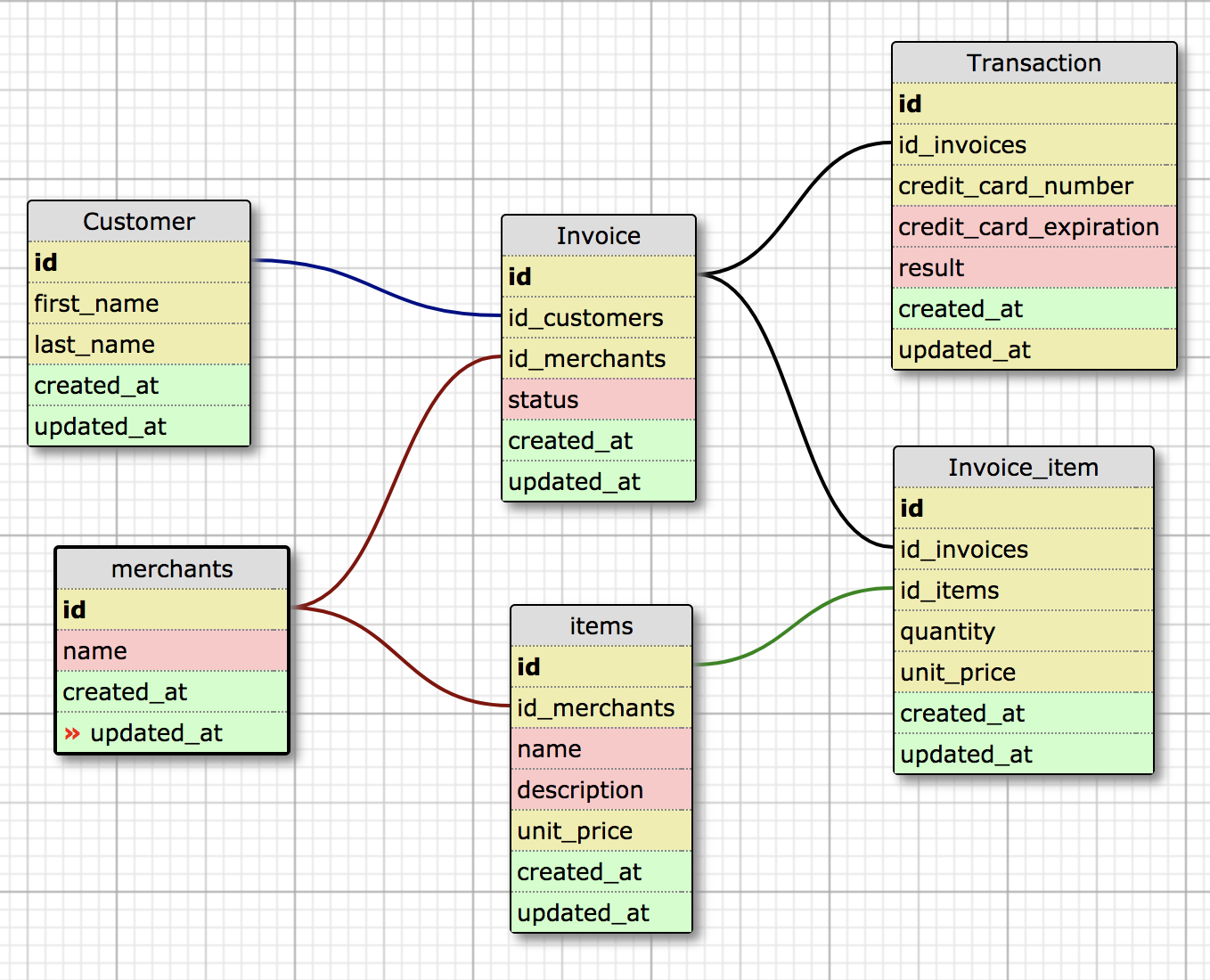
Rales (Sales) Engine is a RESTful API for eCommerce business intelligence. It is made with Ruby on Rails and returns JSON objects for Merchants, Customers, Invoices, Items, Invoice Items and Transactions. Below are instructions on how to setup, install, deploy, run tests, and make API calls.
Fork the Rales Engine Github repository and clone it down into a directory of your choosing.
git clone https://github.com/tylermarshal/rales_engine.git
In this same directory, you will want to clone down the Rales Engine spec harness.
https://github.com/tylermarshal/rales_engine_spec_harness
Move into the rales engine directory & bundle.
cd rales_engine
bundle install
From here you will need to set up the databases:
rails db:create db:migrate
CSV data is included and can be imported into the database with the following rake task:
bundle exec rake import_all
You can check to ensure the data was import correctly by doing the following in your terminal and ensuring each table is not blank:
rails c
Merchant.all
Customer.all
Invoice.all
Item.all
InvoiceItem.all
Transaction.all
If the data is not there, reset your database and try the rake task again:
bundle exec rake db:reset
bundle exec rake import_all
To begin testing, you will want start a server for the rales_engine directory. Open a new terminal tab in the rales_engine directory and enter the following:
rails s
In the first tab (not the one running the server), which should be in the rales_engine directory, enter the following to run the local test suite:
bundle exec rspec
To run the spec harness, move to the directory that rales_engine and rales_engine_spec_harness are both located in (up one directory), then change to the rales_engine_spec_harness root directory and bundle:
cd ..
cd rales_engine_spec_harness
bundle install
With the rails server still running in the second tab, run the spec harness from the root directory:
bundle exec rake
As mentioned previously, Rales Engine is an API that exists to expose business intelligence. This allows a user to
interact with various endpoints through the browser. These include endpoints for the Merchants, Customers,
Invoices, Items, Invoice Items and Transactions databases related to searches by attributes, by their associations,
and endpoints related to business intelligence/analysis. In order to reach these API endpoints, the user must type
the following urls in the browser after starting the server using rails s in the Rales Engine directory.
'http://localhost:3000/api/v1/merchants'
'http://localhost:3000/api/v1/customers/:id'
'http://localhost:3000/api/v1/merchants/:id/revenue?date=x'
'http://localhost:3000/api/v1/merchants/:id/items'
'http://localhost:3000/api/v1/merchants/:id/invoices'
'http://localhost:3000/api/v1/merchants/:id/favorite_customer'
'http://localhost:3000/api/v1/merchants/:id/customers_with_pending_invoices'
'http://localhost:3000/api/v1/merchants/revenue?date=x'
'http://localhost:3000/api/v1/merchants/most_revenue?quantity=x'
'http://localhost:3000/api/v1/merchants/most_items?quantity=x'
'http://localhost:3000/api/v1/merchants/find?parameter=x'
'http://localhost:3000/api/v1/merchants/find_all?parameter=x'

 valid Merchant search parameters are id, name, created_at, and updated_at
'http://localhost:3000/api/v1/customers/'
'http://localhost:3000/api/v1/customers/:id'
'http://localhost:3000/api/v1/customers/:id/transactions'
'http://localhost:3000/api/v1/customers/:id/invoices'
'http://localhost:3000/api/v1/customers/:id/favorite_merchant'
'http://localhost:3000/api/v1/customers/find?parameter=x'
'http://localhost:3000/api/v1/customers/find_all?parameter=x'

valid search parameters for customers are id, first_name, last_name, created_at, and updated_at
'http://localhost:3000/api/v1/invoices/'
'http://localhost:3000/api/v1/invoices/:id
'http://localhost:3000/api/v1/invoices/:id/transactions'
'http://localhost:3000/api/v1/invoices/:id/merchant'
'http://localhost:3000/api/v1/invoices/:id/items'
'http://localhost:3000/api/v1/invoices/:id/invoice_items'
'http://localhost:3000/api/v1/invoices/:id/customer'
'http://localhost:3000/api/v1/invoices/find?parameter=x'
'http://localhost:3000/api/v1/invoices/find_all?parameter=x'

valid search parameters for invoices are id, status, customer_id, merchant_id, created_at, updated_at
'http://localhost:3000/api/v1/invoice_items/'
'http://localhost:3000/api/v1/invoice_items/:id'
'http://localhost:3000/api/v1/invoice_items/:id/item'
'http://localhost:3000/api/v1/invoice_items/:id/invoice'
'http://localhost:3000/api/v1/invoice_items/find?parameter=x'
'http://localhost:3000/api/v1/invoice_items/find_all?parameter=x'

valid search parameters for invoice_items are id, item_id, invoice_id, quantity, unit_price, created_at, updated_at
'http://localhost:3000/api/v1/transactions/'
'http://localhost:3000/api/v1/transactions/:id'
'http://localhost:3000/api/v1/transactions/:id/invoice'
'http://localhost:3000/api/v1/transactions/find_all?parameter=x'
'http://localhost:3000/api/v1/transactions/find?parameter=x'

valid search parameters for transactions are id, invoice_id, credit_card_number, credit_card_expiration_date, result,
created_at, updated_at
'http://localhost:3000/api/v1/items/'
'http://localhost:3000/api/v1/items/:id'
'http://localhost:3000/api/v1/items/:id/merchant'
'http://localhost:3000/api/v1/items/:id/invoice_items'
'http://localhost:3000/api/v1/items/:id/best_day'
'http://localhost:3000/api/v1/items/most_revenue?quantity=x'
'http://localhost:3000/api/v1/items/most_items?quantity=x'
'http://localhost:3000/api/v1/items/find?parameter=x'
'http://localhost:3000/api/v1/items/find_all?parameter=x'

valid search parameters for items are id, name, description, unti_price, created_at, updated_at, merchant_id