Welcome to the VTEX Help Center content repository!
You will find the following folders in this repository:
- .github/workflows: Workflows needed to manage the content of this repository.
- docs-utils: Scripts used to perform adjustments to documentation imported from Contentful.
- docs: Documentation files. Contains subfolders corresponding to each locale (PT, EN, and ES), and within each of them, the following categories:
- announcements: Announcement markdown files.
- faq: FAQ markdown files.
- tracks: Tracks markdown files.
- troubleshooting: Troubleshooting markdown files.
- tutorials: Tutorials markdown files.
- readme-images: Images used in the README.md file.
In this document we will address the following topics related to the Help Center Portal:
- Filling in front matter information
- Applying filters to an announcement
- Applying categorization and filters to a troubleshooting article
- Publishing new articles
- Updating published articles
- Creating redirects
- Settings for specific content
The front matter is the table with metadata about the article you are creating. It contains the following fields:
- title: Article title with single quotes. E.g. 'Adding SKU specifications or fields'
- createdAt: Creation date (UTC) and time in this format
{YYYY}-{MM}-{DD}T{HH}:{MM}:{SS}.{mmm}Z. - updatedAt: Update date (UTC) in this format
{YYYY}-{MM}-{DD}T{HH}:{MM}:{SS}.{mmm}Z. - contentType: Content type (e.g.,
tutorial,updates,trackArticle,frequentlyAskedQuestion,knownIssue). - productTeam: Name of the module to which the article is related.
- slugEN: Article reference slug in the English version. This field must always be filled in with the same value (slug in EN), even in PT and ES version files. This is required for proper locale switching on Help Center.
- locale: Article language (
pt,en, ores). - hidden: (Optional) Identifies whether the article should remain hidden and be accessed only through its link (
trueorfalse).
In addition to the standard fields for all articles, check the specific fields for each type of article below:
- announcementSynopsisEN: Announcement Synopsis information with single quotes. The name of this parameter varies according to the language of the article, for the Portuguese version it must be used
announcementSynopsisPT, and for the Spanish version useannouncementSynopsisES. - author: Technical writer ID in Contentful.
- tags: filters tags of the announcement type (e.g.
New feature,Breaking change) and area(s) (e.g.Orders,Promotions,Storefront, etc). For more information see the section Applying filters to an announcement.
- trackId: Track article identification.
- trackSlugEN: Track slug identification.
- domainFilters: Troubleshooting Area filters. These values identify the product or area in which the user is most likely to associate the issue (for example,
Checkout,Logistics,Master Data). - symptomFilters: Troubleshooting Type filters. These values identify the problem type the user is experiencing (for example,
Loading issue,Misconfiguration,Flow interruption).
The Announcements page allows users to filter announcements by Type and Area. This is made by adding the applicable filtering values to the announcement front matter, in the tags field.
These filters are displayed in the UI in the announcements card, above the title. Each announcement must have one Type filter.
The existing values and their context are:
| Type EN | Tipo PT | Tipo ES | Description |
|---|---|---|---|
New feature |
Nova funcionalidade |
Nueva funcionalidad |
New functionality, modules, or capabilities. |
Improvement |
Melhoria |
Mejora |
Enhancements, optimizations, UX improvements. |
Breaking change |
Breaking change |
Cambio disruptivo |
Platform behavior modifications requiring action. |
Deprecation |
Descontinuação |
Descontinuación |
Discontinued features and products. |
Security update |
Atualização de segurança |
Actualización de seguridad |
Security updates, compliance, vulnerability fixes. |
These filters don't appear in the UI. Each announcement should have at least one Area filter, you can add as many as you need.
The existing values and their context are:
| Area EN | Área PT | Área ES | Description |
|---|---|---|---|
| Admin | Admin | Admin | VTEX Admin. |
| Checkout | Checkout | Checkout | Validation, reCAPTCHA, cart functionality. |
| Catalog | Catálogo | Catálogo | Products, categories, SKUs, specifications. |
| Payments | Pagamentos | Pagos | Gateway, Payment Provider Protocol, payment methods, Billing. |
| Orders | Pedidos | Pedidos | Order Management System (OMS), order processing. |
| Promotions | Promoções | Promociones | Discounts, coupons, campaigns, pricing rules. |
| Prices | Preços | Precios | Price tables, fixed prices, computed prices, price rules. |
| Marketplace | Marketplace | Marketplace | Marketplace Network, integration, seller, channels. |
| Intelligent Search | Intelligent Search | Intelligent Search | Search functionality, merchandising rules. |
| Storefront | Storefront | Storefront | Store Framework, FastStore, Site Editor, CMS Portal (Legacy). |
| Master Data | Master Data | Master Data | Data entities, triggers, customer data. |
| Audit | Audit | Audit | Audit. |
| Identity | Identity | Identity | License Manager, permissions, authentication. |
| Logistics | Logística | Logística | Shipping, inventory, fulfillment. |
| B2B | B2B | B2B | B2B Suit, buyer organizations, cost centers. |
| Integrations | Integrações | Integraciones | Third-party connectors. |
| VTEX Shield | VTEX Shield | VTEX Shield | VTEX Shield news. |
| VTEX Ads | VTEX Ads | VTEX Ads | VTEX Ads news. |
| B2B Buyer Portal | B2B Buyer Portal | B2B Buyer Portal | B2B Buyer Portal news. |
| VTEX Sales App | VTEX Sales App | VTEX Sales App | VTEX Sales App news. |
ℹ️ If you wish to add or remove a filter value, you have to manage them in the helpcenter repository.
See below an example of filters applied to an announcement front matter for each locale:
English:
---
title: 'General availability of new catalog spreadsheet import and export experience'
(...)
locale: en
announcementSynopsisEN: 'The redesigned interface offers export using filters and status tracking.'
tags:
  - New feature
  - Catalog
---
Portuguese:
---
title: 'Nova experiência de importação e exportação de planilhas do Catálogo em disponibilidade global'
(...)
locale: pt
announcementSynopsisPT: 'Interface redesenhada que oferece exportação por filtros e acompanhamento de status.'
tags:
  - Nova funcionalidade
  - Catálogo
---
Spanish:
---
title: 'Nueva experiencia de importación y exportación de plantillas del módulo Catálogo con disponibilidad general'
(...)
locale: es
announcementSynopsisES: 'La interfaz rediseñada ofrece exportación por filtros y seguimiento del status.'
tags:
  - Nueva funcionalidad
  - Catálogo
---The Troubleshooting page allows users to navigate content through:
- Primary category: the article's folder within
docs/{locale}/troubleshooting - Type: values added to
symptomFilters - Area: values added to
domainFilters
Troubleshooting primary categories are determined by the folder where the article is saved. Use the category that best matches the broad operational context of the issue.
The current troubleshooting categories are:
| Category EN | Categoria PT | Categoria ES | Description |
|---|---|---|---|
| Integrations and channels | Integrações e canais | Integraciones y canales | Integration and synchronization issues with marketplaces, affiliates, and external connectors. |
| Merchandising and search | Merchandising e busca | Merchandising y búsqueda | Offer and discoverability issues involving catalog setup, indexing, search, pricing, and promotions. |
| Orders and fulfillment | Pedidos e fulfillment | Pedidos y fulfillment | Post-order operations such as status progression, invoicing, cancellation, shipment handling, and reservation behavior. |
| Data access and security | Acesso a dados e segurança | Acceso a datos y seguridad | Admin access, Master Data, notifications, and technical security/configuration topics. |
| Checkout and financial | Checkout e financeiro | Checkout y financiero | Checkout, order placement, payment authorization, pricing-total consistency, and other transactional failures. |
| B2B | B2B | B2B | B2B organization structure, permissions, and company-specific flows. |
These filters appear in the Troubleshooting UI under Type. Each troubleshooting article should usually have 1 to 2 values in symptomFilters.
The existing values and their context are:
| Type EN | Tipo PT | Tipo ES | Description |
|---|---|---|---|
| Sync issue | Erro de sincronização | Error de sincronización | Failed integrations or synchronization between systems, channels, or connectors. |
| Loading issue | Erro de carregamento | Error de carga | Pages, products, content, or metrics not appearing or not loading correctly. |
| Flow interruption | Interrupção no fluxo | Interrupción en el flujo | Statuses, steps, or operational flows that do not progress as expected. |
| Validation error | Erro de validação | Error de validación | Schema, header, spreadsheet, API, or input validation failures. |
| Access restriction | Restrição de acesso | Restricción de acceso | Permission, authorization, profile, or restricted-access problems. |
| Misconfiguration | Configuração incorreta | Configuración incorrecta | Incorrect setup, missing settings, or misconfigured policies and rules. |
| Notification issue | Erro de notificação | Error de notificación | Email delivery, alerts, reports, or notification-related failures. |
These filters appear in the Troubleshooting UI under Area. Each troubleshooting article should usually have 1 to 3 values in domainFilters.
The existing values and their context are:
| Area EN | Área PT | Área ES | Description |
|---|---|---|---|
| Admin | Admin | Admin | VTEX Admin. |
| Checkout | Checkout | Checkout | Checkout completion issues, validation, session, and cart behavior. |
| Catalog | Catálogo | Catálogo | Product and SKU setup, attributes, and indexing. |
| Payments | Pagamentos | Pagos | Payment flow, capture, authorization, and gateway behavior. |
| Orders | Pedidos | Pedidos | Order creation, updates, and statuses. |
| Promotions | Promoções | Promociones | Promotion rules and context-based applicability. |
| Prices | Preços | Precios | Price tables, fixed/computed pricing, and price divergence. |
| Marketplace | Marketplace | Marketplace | Marketplace Network and channel operations. |
| Intelligent Search | Intelligent Search | Intelligent Search | Search behavior, relevance, and product exposure. |
| Storefront | Storefront | Storefront | Storefront rendering and behavior issues. |
| Master Data | Master Data | Master Data | Entities, schemas, triggers, and data behavior. |
| Audit | Audit | Audit | Action and event traceability. |
| Identity | Identity | Identity | Users, roles, authentication, and permissions. |
| Logistics | Logística | Logística | Delivery, SLA, carriers, and logistics stock. |
| B2B | B2B | B2B | Organizations, cost centers, and B2B rules. |
| Integrations | Integrações | Integraciones | Third-party connector and integration issues. |
| VTEX Shield | VTEX Shield | VTEX Shield | Application security and data protection topics. |
| VTEX Ads | VTEX Ads | VTEX Ads | Ads-related catalog and operational topics. |
| VTEX Sales App | VTEX Sales App | VTEX Sales App | In-store sales app flow issues. |
ℹ️ If you wish to add or remove a troubleshooting filter value, you have to manage it in the helpcenter repository.
See below an example of categorization and filters applied to a troubleshooting article front matter for each locale:
English:
---
title: "My carrier isn't showing at checkout"
(...)
locale: en
domainFilters:
  - Checkout
  - Logistics
symptomFilters:
  - Loading issue
  - Misconfiguration
---
Portuguese:
---
title: 'Minha transportadora não aparece no Checkout'
(...)
locale: pt
domainFilters:
  - Checkout
  - Logística
symptomFilters:
  - Erro de carregamento
  - Configuração incorreta
---
Spanish:
---
title: 'Mi transportadora no se muestra en el checkout'
(...)
locale: es
domainFilters:
  - Checkout
  - Logística
symptomFilters:
  - Error de carga
  - Configuración incorrecta
---When classifying troubleshooting content, apply the following rules:
- Use domainFilters as the primary discovery axis.
- Use symptomFilters as the secondary refinement axis.
- Treat the primary category (folder) as the broad navigation layer, not as the main retrieval mechanism.
- For hybrid articles, prioritize:
- the product or area the user is most likely to associate with the issue as the main domain filter
- the dominant symptom as the main troubleshooting refinement
- additional domain filters only when they materially improve discovery
To keep the troubleshooting taxonomy consistent as the section grows, follow these guidelines:
- Apply 1 primary category per article.
- Apply 1 to 2 symptomFilters per article in most cases.
- Apply 1 to 3 domainFilters per article in most cases.
- Only promote niche filter values when recurring article volume justifies them.
- Only propose new primary categories when the current structure creates repeated ambiguity for users and editors.
- Prioritize the user's mental model over internal team ownership or root-cause attribution when deciding how to classify an article.
Follow the steps below to create a new article in the Help Center:
-
Open a branch in the help-center-content repository.
-
Add a new file in the desired folder, and write the content of the article according to the Template --> TBD.
⚠️ Make sure the file name (slug) is unique and an exact copy of the article slug. -
Add images to the article, if necessary.
-
Fill in the front matter of the article.
-
Submit your PR for review on GitHub.
-
Send the PR link in the
#education-prsSlack channel for review by another technical writer. -
After review, register the PR link in the
Document Linkfield of the JIRA task and request the translation of the content, moving the card status toTranslating. -
Once the translations are complete, check the contents of the two files created by the localization team in the folders corresponding to each locale (EN and ES) of the repository. If the article in the PT version contains images, repeat this procedure to insert them into the EN and ES versions.
-
Approve the PR and apply the merge to publish the article.
ℹ️ The help-center-content repository is synched to the
helpcenterrepository, so new articles are automatically updated in the Help Center portal's navigation sidebar.
In some situations, it may be necessary to insert images, GIFs, or videos into an article to help the user understand complex procedures.
To insert an image to an article follow the steps below:
-
Access the folder where the article is located within the repository.
-
Save the image (respecting the maximum image size) inside this folder, naming it according to the markdown file name and slug. For instance, if the article file name and slug is "how-to-create-a-catalog-category", the image should be saved as
how-to-create-a-catalog-category_1.png.ℹ️ If the article has more than one image, they must be named in numerical sequence. For instance,
how-to-create-a-catalog-category_1.png,how-to-create-a-catalog-category_2.png. -
Open the article and add
, replacing:{{Image name}}by an image identification name of your choice{{path}}by the path where you saved the image{{image-slug-name}}by the image slug name
Example: .
⚠️ After localization completes the translations, you must repeat this same process in the respective article folders for the EN and ES versions, modifying the information according to the specific language.
To ensure efficient page load times and adhere to GitHub space storage best practices, we set a maximum file size limit of 50 MB.
If you need to use an illustration that exceeds this value, you can compress it using tools such as ILoveImg or FreeConvert, to reduce the final file size. Additionally, you can also adjust the article content to allow the illustration to be split into smaller file sizes.
⚠️ Whenever you use an image compressor, check the visual quality of the file after compression.
If you wish to provide a downloadable file directly within your article (such a table or PDF file), you must attach it, creating a reference as follows:
- Open a branch in the help-portal-content repository.
- Copy the file you want to make available for download to the same directory as the article where it will be inserted. For instance, to attach a spreadsheet within an article located at
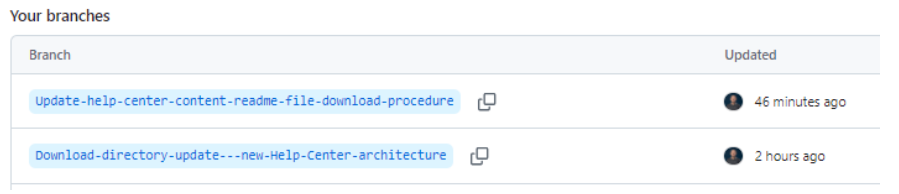
docs/pt/tutorials/Payments/Payment Settings/list-of-payment-providers-by-country.md, you need to save it in the directorydocs/pt/tutorials/Payments/Payment Settings. - Go to the branches page, and under Your branches section, click on the name of the branch you created.
- Locate the folder where you saved the file and click on it.

- Right-click on the Raw option and select Copy link address (Copiar endereço do link).
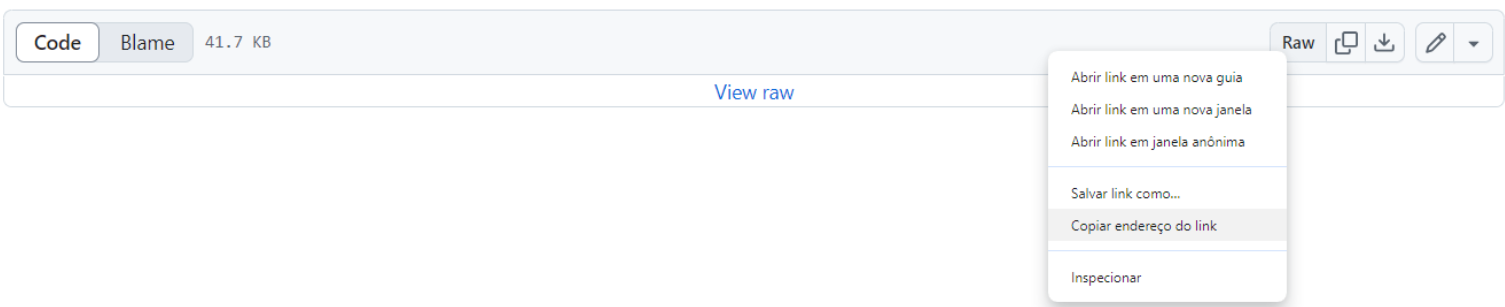
ℹ️ Address link example:
https://github.com/vtexdocs/help-center-content/raw/main/docs/pt/tutorials/Payments/Payment%20Settings/Payment%20Provider%20x%20Countries%20-%20August%202024.xlsx
- Access the article where you want to add the file and insert the link obtained in the previous step in the desired location.

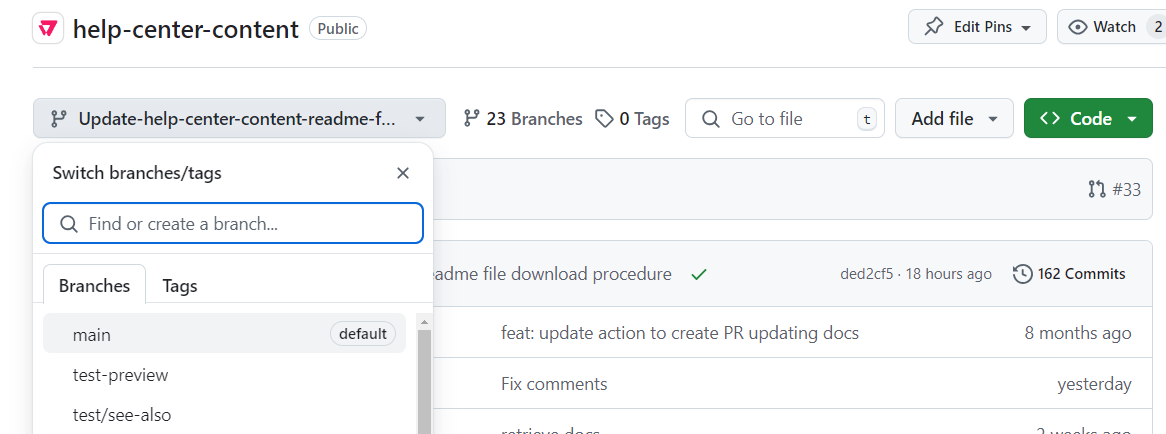
- Return to the main branch by clicking Main in the Branches tab.
- Submit your PR for review.
To update the content of an article that is already published on the Help Center Portal, follow the steps below:
- Open a branch in the help-portal-content repository.
- Access and update the PT version of the desired file in the repository.
- Access and update the files in the EN and ES versions with the same information (in Portuguese) inserted in the PT file.
- Submit your PR for review.
- Register the PR link in the
Document Linkfield of the JIRA task and request the translation of the content (EN and ES versions), moving the card status toTranslating. - After the translation is complete, check the content translated by the localization team in the EN and ES version files.
- Approve the PR and apply the merge to publish the article.
If an article published on Help Center must be archived and another article will be used in its place, it is necessary to create a redirect to allow users to access the new content.
To create a redirect, follow the instructions available in the README file of the help-center repository.
See in this section some specific settings that must be applied according to the type of article.
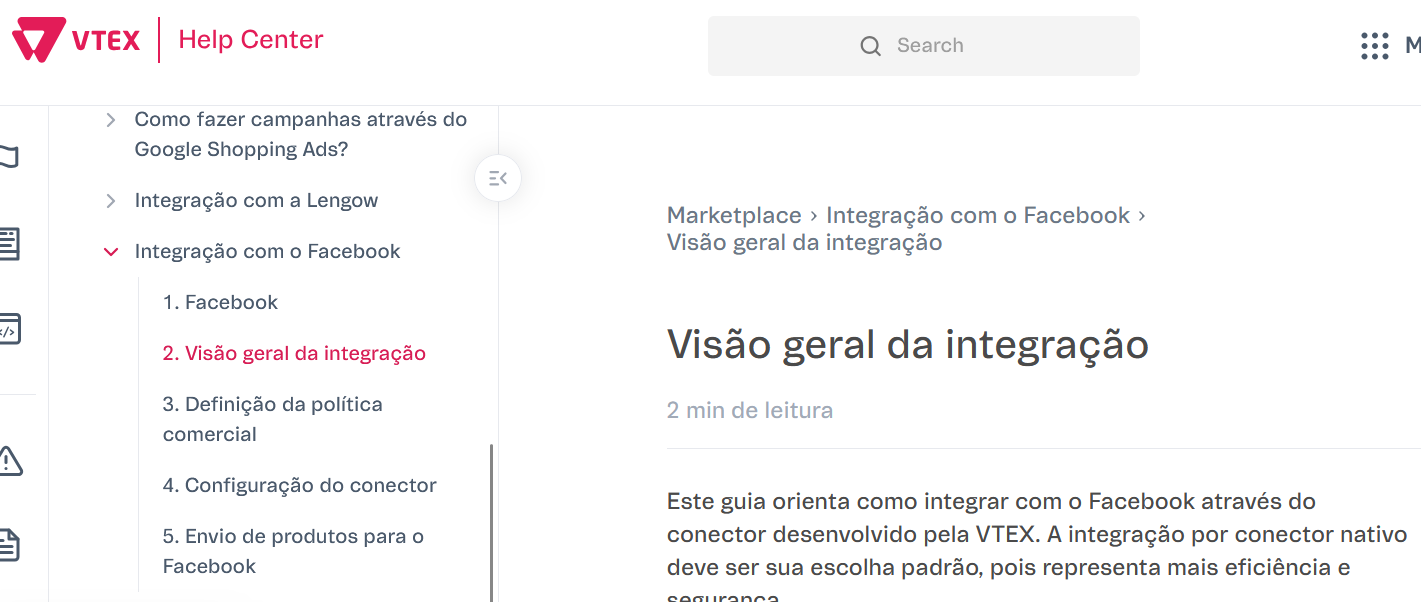
Track articles' titles must contain the reference numbers in the navigation sidebar, but not in the title of the article page.
This repository uses GitHub Actions for automating various tasks related to content management, navigation generation, and documentation maintenance. Below are details about each workflow.
Source: .github/workflows/nav-generation.yml
Summary: This workflow automatically generates the navigation structure for the VTEX Help Center by processing all markdown files in the repository. It creates a comprehensive navigation.json file that contains the hierarchical structure of all documentation, organized by categories, subcategories, and individual articles across all supported languages (PT, EN, ES).
Trigger Conditions:
- Pull request events:
opened,synchronize,reopened - Automatically runs when PRs are created or updated
Process Overview:
- Content Scanning: Processes 10,000+ markdown files across all locales and content types
- CLI Download: Uses multiple fallback strategies to obtain the navigation generator CLI:
- Primary:
npx github:vtexdocs/vtexhelp-nav-cli#main(GitHub tarball) - Fallback 1:
npx git+https://github.com/vtexdocs/vtexhelp-nav-cli.git#main - Fallback 2: Direct git clone and local build
- Fallback 3: Curl download + unzip (network resilience)
- Primary:
- Navigation Generation: Creates structured JSON with:
- 600+ categories and subcategories
- 3,400+ individual documents
- Full multilingual support (PT/EN/ES)
- Cross-language document linking
- File Commit: Automatically commits the generated
public/navigation.jsonback to the PR branch - Artifacts: Uploads the navigation file as a downloadable artifact
- Reporting: Provides detailed job summaries with statistics and file information
Output:
- File:
public/navigation.json(~58,000+ lines, ~2.6MB) - Structure: Hierarchical JSON with navbar sections, categories, subcategories, and articles
- Metadata: Includes titles, slugs, publication status, and cross-references for all languages
- Coverage: 100% language coverage for all supported locales
Performance:
- Generation Time: ~5-6 seconds for full repository scan
- Total Workflow Time: ~2-3 minutes including setup and commit
- Network Resilience: Multiple fallback mechanisms handle GitHub runner limitations
Key Features:
- Robust Error Handling: Multiple download strategies ensure reliable CLI access
- Git Integration: Handles detached HEAD states and automatically commits results
- Validation: Performs content validation and reports duplicate slugs or issues
- Incremental Updates: Only commits when navigation content actually changes
- Artifact Preservation: Generated files are available for download even if commit fails
Dependencies:
- actions/checkout@v4
- Function: Checks out the PR branch for processing
- actions/setup-node@v4
- Function: Sets up Node.js environment (version 20)
- actions/upload-artifact@v4
- Function: Uploads generated navigation.json as downloadable artifact
- vtexdocs/vtexhelp-nav-cli (external)
- Function: CLI tool that processes markdown files and generates navigation structure
Usage Notes:
- Automatically triggered on all PR activity - no manual intervention required
- Generated navigation.json is committed directly to the PR branch
- Workflow includes comprehensive logging for debugging and monitoring
- Safe for concurrent execution with other workflows due to branch-specific concurrency controls
Source: .github/workflows/broken-page-finder.yml
Summary: This workflow leverages the vtexdocs/devportal-docsearch-action to scrape files from the Help Center. Instead of indexing them, it logs errors to identify broken or problematic pages. It uses a specific branch version of the docsearch action that has been stripped down to only log errors.
Trigger Conditions:
- Manual trigger (workflow_dispatch)
- Configurable inputs:
- directory (default: 'docs')
- batch_size (default: 500)
- sleep_time (default: 0)
- files (optional comma-separated list of specific files to process)
Process Overview:
- File Discovery: Finds all markdown files in the specified directory and subdirectories
- Batch Processing: Splits files into manageable batches to avoid rate limits
- Error Detection: Uses the specialized docsearch action to identify broken pages
- Error Logging: Records errors to a spreadsheet for analysis
Key Features:
- Batch Processing: Handles large numbers of files by processing them in configurable batches
- Flexible Input: Can process all files in a directory or specific files via comma-separated list
- Rate Limit Management: Configurable sleep time between batches
- Error Focus: Specifically designed to identify and log problematic pages
Dependencies:
- actions/checkout@v4
- Function: Checks out the repository code
- vtexdocs/devportal-docsearch-action@broken-page-finder
- Function: Specialized version that logs errors instead of indexing content
Source: .github/workflows/changelog.yml
Summary: This workflow automatically generates changelogs and manages version tags for the repository. It uses standard-version to create semantic versioning and generates changelog entries based on commit messages.
Trigger Conditions:
- Push to main branch
- Pull request closed on main branch (only when merged)
Process Overview:
- Version Detection: Finds the next available version tag and bumps if needed
- Changelog Generation: Uses standard-version to generate changelog entries
- Tag Creation: Creates and pushes version tags
- Cleanup: Handles tag cleanup on failure
Key Features:
- Automatic Versioning: Automatically determines and increments version numbers
- Semantic Versioning: Follows semantic versioning principles
- Changelog Generation: Creates comprehensive changelog entries
- Failure Recovery: Cleans up tags if the process fails
- Git Integration: Automatically commits and pushes changes
Dependencies:
- actions/checkout@v4
- Function: Checks out the repository with full history
- actions/setup-node@v4
- Function: Sets up Node.js environment (version 20)
- standard-version (npm package)
- Function: Generates changelogs and manages versioning
Source: .github/workflows/index-documents.yml
Summary: This workflow automatically indexes changed documentation files into the VTEX Docs search system. When markdown files under docs/ are added or modified, the workflow sends them to the indexing API, which chunks the content, generates embeddings, and stores them for hybrid search (BM25 + vector similarity).
Trigger Conditions:
- Push to
mainormasterbranch, when files matchingdocs/**/*.mdare changed - Manual trigger (
workflow_dispatch) with optionalfull_reindexboolean input to reindex all documents
Process Overview:
- Changed File Detection: Uses
git diffto identify added, copied, modified, or renamed markdown files underdocs/ - Full Reindex Mode: When triggered manually with
full_reindex: true, discovers all markdown files viafind docs -name '*.md' - Batched Indexing: Sends files to the indexing API in batches of 10, with a 300-second timeout per batch
- Idempotency: The API uses content-hash-based skip optimization — unchanged files are not re-indexed
- Error Reporting: Logs per-batch results and emits GitHub Actions warnings for failures
Key Features:
- Content-Hash Skip: Files whose content hasn't changed since last indexing are automatically skipped
- Partial Failure Resilience: If one batch fails, the workflow continues with remaining batches
- Batch Processing: Files are sent in groups of 10 to avoid timeout issues with large changesets
- Full Reindex: Manual dispatch with
full_reindex: truere-processes all documents in the repository
Required Secrets:
INDEXING_URL: Base URL of the VTEX Docs API (e.g.,https://vtexdocs-edge.vtex.com)INTERNAL_ACCESS_KEY: API consumer key withindex-documentspermission
Dependencies:
- actions/checkout@v4
- Function: Checks out the repository with
fetch-depth: 2for diff comparison
- Function: Checks out the repository with
- jq (pre-installed on GitHub runners)
- Function: JSON processing for file lists and API response parsing
- curl (pre-installed on GitHub runners)
- Function: HTTP requests to the indexing API