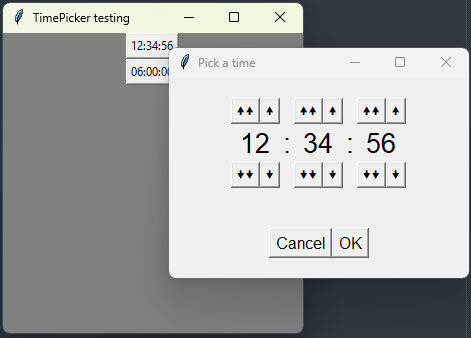
A tkinter widget.
This is a button that shows time in the format HH:MM:SS. When clicked, it opens a dialog window for editing the time value.
pip install tk-digital-time-picker
TimePicker.__str__()				# -> str: format 'HH:MM:SS'
TimePicker.get_seconds()			# -> int: total seconds
TimePicker.set_value(value: str)	# value format: 'HH:MM:SS'
TimePicker.set_value(value: list)	# value: [h, m, s]
TimePicker.set_value(value: tuple) # value: (h, m, s)import tkinter as tk
from tk_digital_time_picker import TimePicker
root = tk.Tk()
root.title('TimePicker testing')
root.geometry('300x300+1000+200')
root.configure(bg='grey')
TimePicker(root, hours=12, minutes=34, seconds=56).pack()
picker = TimePicker(root, hours_limit=100)
picker.pack()
picker.set_value([1, 2, 3])
print(picker) # > 01:02:03
picker.set_value('99:59:59')
print(picker) # > 99:59:59
picker.seconds += 1
print(picker) # > 00:00:00
picker.minutes += 120
print(picker) # > 02:00:00
picker.hours *= 3
print(picker) # > 06:00:00
print(picker.get_seconds()) # > 21600
root.mainloop()