Welcome to the CNN-Based Malware Detection project! This repository implements a Convolutional Neural Network (CNN) to detect malware by analyzing executable (EXE) files as grayscale images. By converting raw byte streams of EXE files into images and leveraging the powerful pattern recognition capabilities of CNNs, this approach effectively distinguishes between benign and malicious files. This README guides you through the entire project—from concept to execution—providing all the details you need to understand, set up, and extend this innovative solution.
- Project Overview
- Features
- Technologies Used
- Installation
- Usage
- Project Structure
- Dataset
- Methodology
- Model Architecture
- Training and Evaluation
- Results
- Future Improvements
- Contributing
- License
Malware detection is a cornerstone of cybersecurity. Traditional methods often rely on signature-based or heuristic techniques, which can struggle to keep pace with evolving threats. This project introduces an innovative approach: using Convolutional Neural Networks (CNNs) to detect malware by treating executable files as images. Here’s the big idea:
- EXE as Images: We convert the raw byte streams of EXE files into grayscale images.
- CNN Power: CNNs, renowned for their ability to recognize patterns in images, identify features that differentiate malicious files from benign ones.
- End-to-End Solution: The project covers data preprocessing, model training, and evaluation, all built with Python and TensorFlow.
- Scalability: Efficiently processes large datasets.
- Automation: Eliminates manual feature engineering.
- Accuracy: Achieves high detection rates through deep learning.
This project is designed to run in GPU-supported environments like Google Colab or Kaggle, but it can also be adapted for local execution.
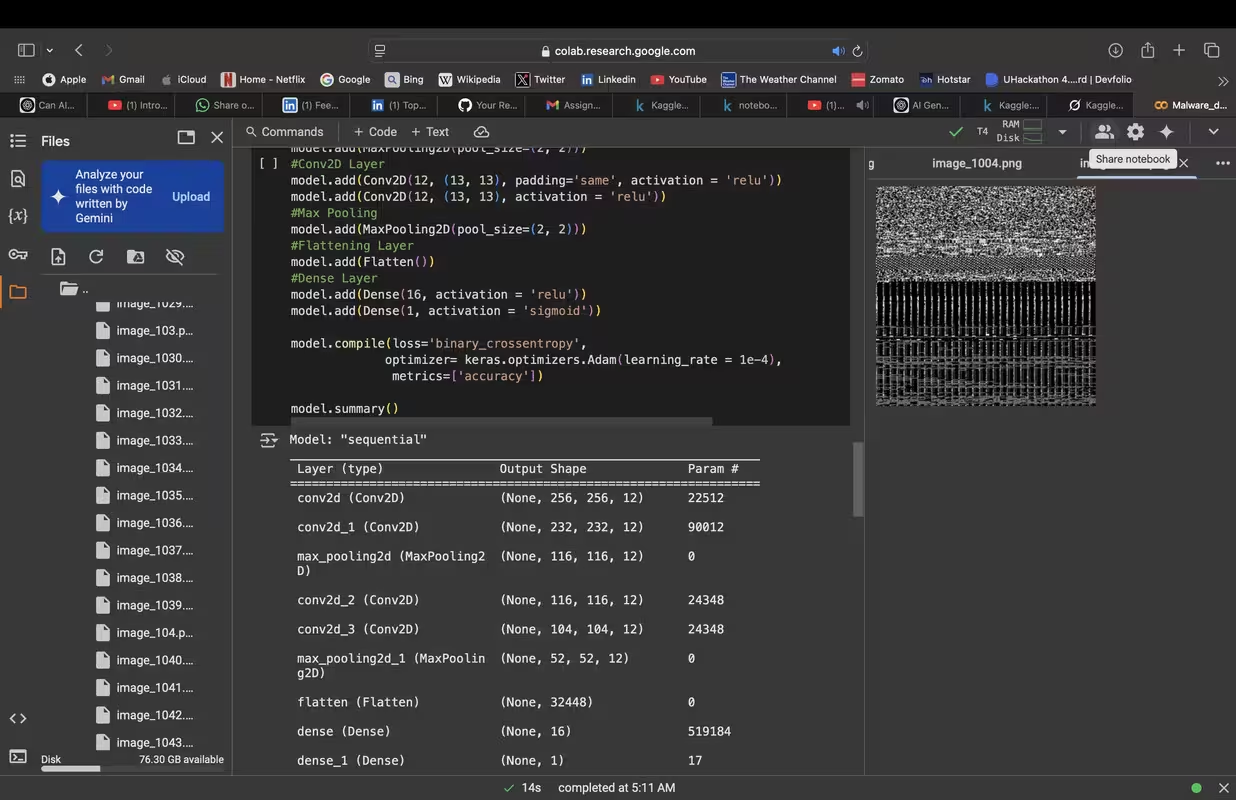
- EXE to Image Conversion: Transforms raw byte streams into grayscale images for CNN analysis.
- Pattern Recognition: Harnesses CNNs to detect intricate patterns unique to malware.
- High Accuracy: Reaches up to 97.5% validation accuracy after training.
- Scalable Workflow: Handles large datasets with ease.
Here’s the tech stack powering the project:
- Python: The backbone of development (version 3.8+ recommended).
- TensorFlow: Framework for building and training the CNN model.
- NumPy: Manages array operations during preprocessing.
- Kaggle API: Simplifies dataset downloading and management.
- Jupyter Notebook: Provides an interactive environment for coding and experimentation.
Ready to dive in? Follow these steps to set up the project locally:
- Clone the Repository:
git clone https://github.com/yourusername/CNN-Malware-Detection.git
cd CNN-Malware-Detection
Here’s how to use the project once it’s set up:
-
Prepare the Data:
- The notebook downloads and extracts the dataset (
malware-dataset.zip), containing benign and malicious EXE files. - Raw bytes are converted into grayscale images (e.g., 64x64 pixels) for CNN input.
- The notebook downloads and extracts the dataset (
-
Train the Model:
- Run the notebook cells to preprocess data, define the CNN, and start training.
- Training runs for 50 epochs with 50 steps per epoch, tracking loss and accuracy.
-
Evaluate Results:
- Post-training, check the validation accuracy and loss to assess model performance.
- Sample output:
Epoch 29/50 50/50 [==============================] - 27s 541ms/step - loss: 0.0184 - accuracy: 0.9944 - val_loss: 0.0575 - val_accuracy: 0.9750
Here’s how the project is organized:

CNN-Malware-Detection/
├── Malware_Detection_CNN.ipynb  # Main notebook with code and explanations
├── files/                       # Directory for dataset files
│   ├── benign/                  # Benign EXE files
│   └── malicious/               # Malicious EXE files
├── README.md                    # This file
└── (optional) kaggle.json       # Kaggle API key (not tracked in git)
The dataset comes from Kaggle (yashvermasexy/malware-dataset) and includes:
- Benign Files: Non-malicious executables.
- Malicious Files: Malware-infected executables.
- Size: ~437 MB (unzipped into
files/).
Each EXE file is transformed into a grayscale image:
- Read the raw byte stream (e.g.,
E4 C0 56 A3). - Reshape into a 2D matrix (e.g., 64x64).
- Normalize pixel values to 0-255.
This project harnesses CNNs' pattern recognition capabilities to detect malware by treating EXE files as images. Here’s the step-by-step process:
-
EXE to Image Conversion:
- Raw bytes are read into an array.
- The array is reshaped into a square matrix (e.g., 64x64) and converted into a grayscale image, where each byte maps to a pixel intensity.
-
Pattern Recognition with CNNs:
- Convolution Layers: Apply filters to detect features like edges or textures unique to malware.
- Pooling Layers: Reduce image size while retaining key information, boosting efficiency.
- Classification: A final layer distinguishes benign from malicious based on learned patterns.
-
Training and Optimization:
- The model trains on labeled data, adjusting filter weights to minimize errors.
- Optimal settings (from experimentation): 2 hidden layers, 16 filters, 64x64 images.
The CNN is structured as follows:
- Input Layer: Takes 64x64 grayscale images.
- Convolution Layer 1: Multiple Conv2D layers with 16 filters (e.g., 3x3), followed by MaxPooling and optional Dropout.
- Convolution Layer 2: More Conv2D layers with 16 filters, followed by MaxPooling.
- Flatten Layer: Converts 2D feature maps into a 1D vector.
- Dense Layer: Fully connected layer for classification.
- Output Layer: Sigmoid activation for binary classification (benign vs. malicious).
- Epochs: 50
- Steps per Epoch: 50
- Optimizer: Adam
- Loss Function: Binary cross-entropy
- Metrics: Accuracy
The model uses the Adam optimizer and binary cross-entropy loss. Performance is tracked via accuracy and loss on training and validation sets.
-
Training Process:
- Feed preprocessed image batches into the CNN.
- Update weights based on loss.
- Validate after each epoch.
-
Duration: 50 epochs, 50 steps per epoch.
The model delivers impressive results:
- Best Validation Accuracy: 97.5% (Epoch 29)
- Best Validation Loss: 0.0575 (Epoch 29)
- Training Trends:
- Training accuracy climbs to 99.9%.
- Validation accuracy stabilizes at 92.5%-97.5% after 20 epochs.