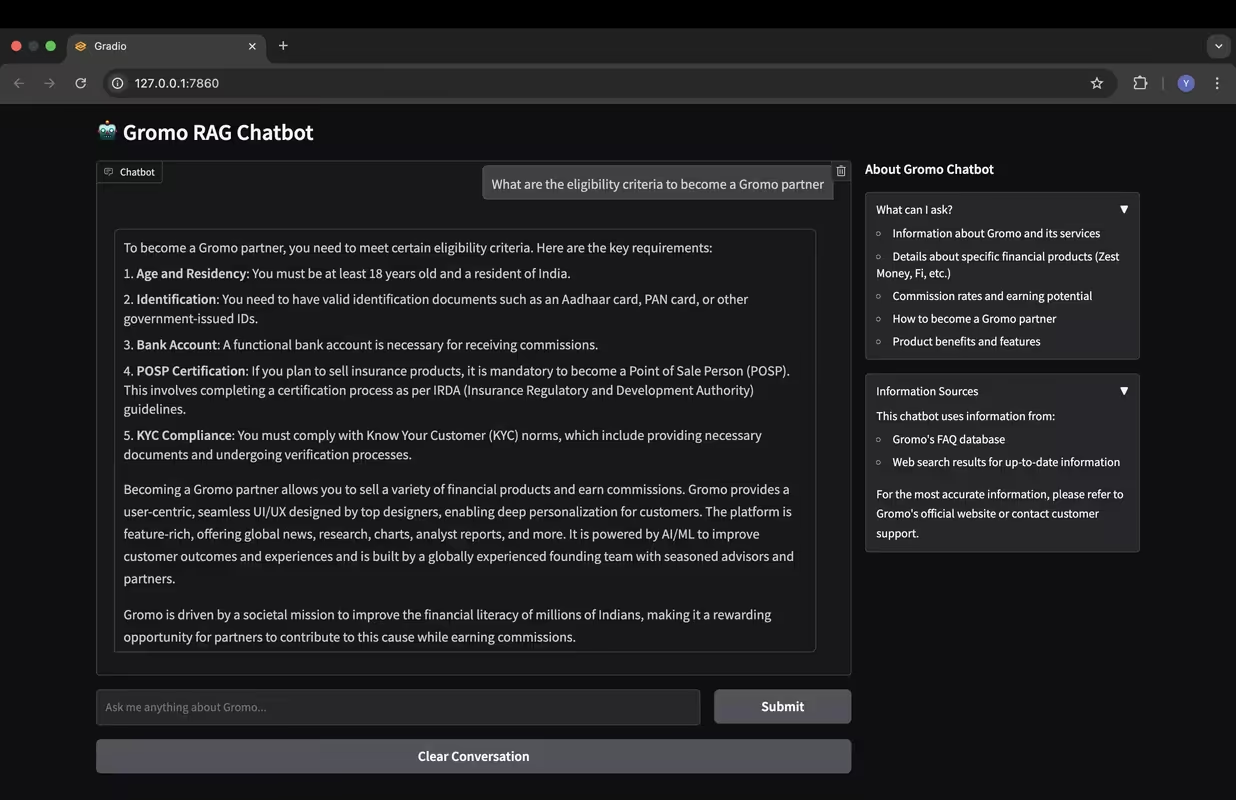
A powerful Retrieval-Augmented Generation (RAG) chatbot for Gromo that provides intelligent responses by combining:
- 📚 Company FAQ dataset - For accurate company-specific information
- 🔎 Real-time web search results - Using SERP API for up-to-date information
-
🧠 Advanced LLM Support:
- Mistral AI API (recommended for best performance)
- Qwen QwQ model (local deployment)
- Configurable for various models based on your needs
-
📊 Enhanced Context Understanding:
- Implements RAG architecture using Langchain
- Vector database for efficient similarity search
- Contextual response generation with relevant information retrieval
-
🌐 Real-time Web Search Integration:
- SERP API integration for current information
- Blends FAQ knowledge with web search results
- Provides citations and sources for information
-
🖥️ Multiple Interface Options:
- Gradio UI with modern interface (recommended)
- Streamlit UI alternative
- FastAPI endpoints for application integration
-
🛠️ Developer-Friendly Design:
- Modular code structure
- Extensive documentation
- Easy customization options
gromo_rag/
├── data/                  # Directory for FAQ dataset
├── src/                   # Source code
│   ├── __init__.py
│   ├── config.py          # Configuration settings
│   ├── data_loader.py     # Load and process FAQ data
│   ├── embeddings.py      # Vector embeddings for RAG
│   ├── rag_chain.py       # RAG implementation with Langchain
│   ├── web_search.py      # Web search integration with SERP API
│   └── utils.py           # Utility functions
├── app_gradio.py          # Gradio application (recommended)
├── app.py                 # Streamlit application
├── app_fastapi.py         # FastAPI application
├── test_chatbot.py        # Script to test the chatbot
├── init_vector_store.py   # Script to initialize vector store
├── .env                   # Environment variables (not tracked by git)
├── requirements.txt       # Project dependencies
└── README.md              # Project documentation
git clone https://github.com/yasboop/RAG-Websearch-Mistral.git
cd RAG-Websearch-Mistralpip install -r requirements.txtCreate a .env file with your API keys:
# Mistral AI API key
MISTRAL_API_KEY=your_mistral_api_key_here

# SERP API key for Google search
SERPAPI_API_KEY=your_serpapi_key_here
python init_vector_store.py# Using Gradio (recommended)
python app_gradio.py
# Using Streamlit
streamlit run app.py
# Using FastAPI
python app_fastapi.pyTest the chatbot functionality with sample questions:
python test_chatbot.pyOr test with a specific question:
python test_chatbot.py "What financial products does Gromo offer?"Customize the chatbot by modifying the configuration in src/config.py:
-
Model Settings:
- Use Mistral AI API:
USE_MISTRAL_API = True - Use local Qwen model:
USE_MISTRAL_API = FalseandUSE_QUANTIZED_MODEL = False - Use quantized model for AWS deployment:
USE_QUANTIZED_MODEL = True
- Use Mistral AI API:
-
RAG Parameters:
- Adjust context window size
- Modify similarity search parameters
- Fine-tune retrieval strategy
-
Web Search Options:
- Enable/disable web search
- Change search result count
- Adjust search relevance parameters
The chatbot can be integrated into other applications through the FastAPI interface:
-
Start the API server:
python app_fastapi.py
-
Send requests to the API:
curl -X POST http://localhost:8000/chat \
  -H "Content-Type: application/json" \
  -d '{"query": "What is Gromo?"}'
To use the web search functionality:
- Visit https://serpapi.com/ and sign up for an account
- Navigate to your dashboard to find your API key
- Add the API key to your
.envfile asSERPAPI_API_KEY
This project includes scripts for AWS EC2 deployment. See AWS_DEPLOYMENT.md for detailed instructions.
To use a different knowledge base:
- Replace the CSV file in the
data/directory - Update the data loading logic in
src/data_loader.pyif necessary - Reinitialize the vector store with
python init_vector_store.py
MIT