
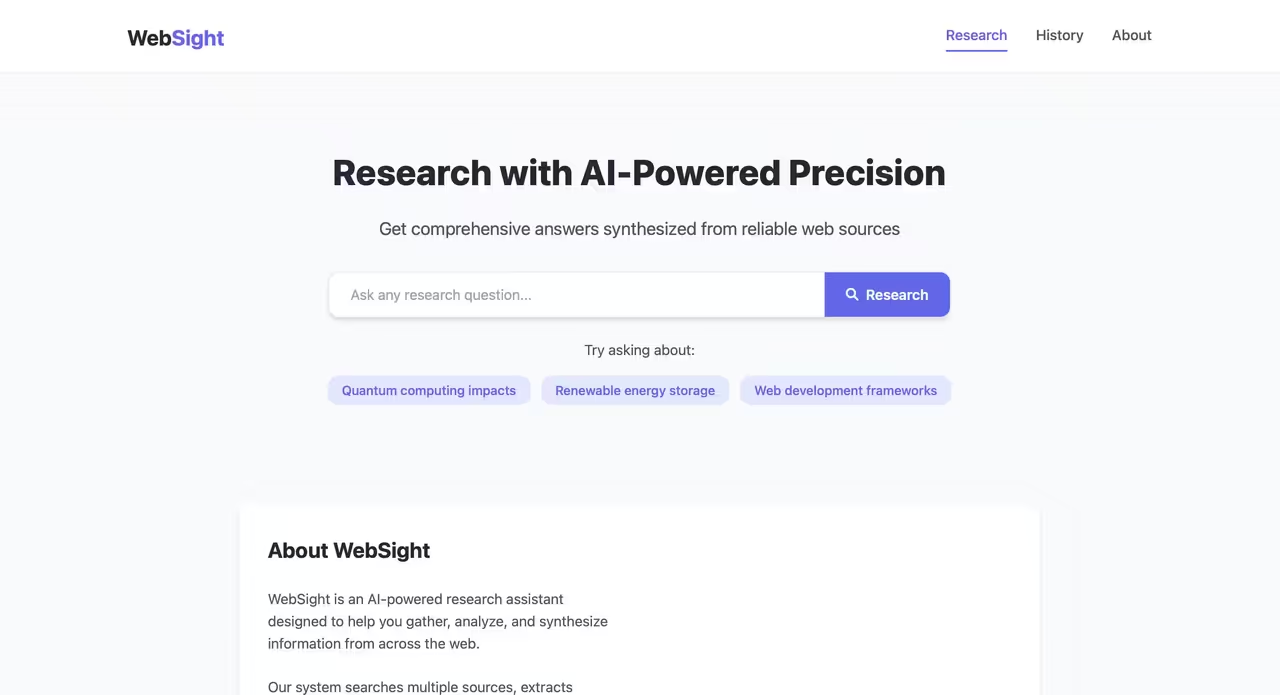
WebSight is an advanced AI-powered web research assistant that helps you find, analyze, and synthesize information from the web. It uses Google's Gemini API to provide comprehensive answers to your research questions by analyzing multiple sources and delivering curated, contextual information.
- Powerful Research Capabilities: Ask complex questions and get comprehensive answers synthesized from multiple web sources
- Visual Research Process: See exactly how WebSight analyzes and processes information in real-time
- Context-Aware Responses: WebSight maintains conversation context, remembering previous queries for more relevant follow-up answers
- Source Attribution: All information is properly cited with links to original sources
- User-Friendly Interface: Clean, intuitive UI inspired by modern research tools
- Mobile-Responsive Design: Works seamlessly across desktop and mobile devices
Try WebSight now (Deployed on Google cloud): https://websight-928850085859.us-central1.run.app
- Python 3.9 or higher
- Google Gemini API key from Google AI Studio
-
Clone the repository:
git clone https://github.com/yasboop/WebSight.git cd websight -
Create a virtual environment:
python -m venv venv source venv/bin/activate # On Windows: venv\Scripts\activate -
Install dependencies:
pip install -r requirements.txt -
Create a
.envfile in the project root with your API key:GOOGLE_API_KEY=your_gemini_api_key_here PORT=5001 -
Start the application:
python app.py -
Open your browser and navigate to:
http://localhost:5001
-
Build the Docker image:
docker build -t websight . -
Run the container:
docker run -p 5001:5001 --env-file .env websight -
Access WebSight at:
http://localhost:5001
- Enter your research question in the search box
- Click the "Research" button or press Enter
- Watch as WebSight:
- Analyzes your query
- Searches for relevant information
- Extracts content from web pages
- Analyzes the content
- Synthesizes a comprehensive answer
- Review the answer and cited sources
- Ask follow-up questions that build on previous context
- "What are the latest advancements in renewable energy storage?"
- "Explain quantum computing in simple terms"
- "How does Python compare to JavaScript for web development?"
- "What are the current economic impacts of climate change?"
WebSight follows a modular architecture with these key components:
- Web Interface: Flask-based frontend with responsive design
- Research Agent: Coordinates the research process using specialized tools
- AI Integration: Leverages Google's Gemini API for natural language processing
- Search Tools: Uses DuckDuckGo for privacy-focused web searches
- Content Extraction: Retrieves and parses relevant content from web pages
- Session Management: Maintains conversation context between queries
For more details, see ARCHITECTURE.md.
WebSight's design prioritizes:
- Transparency: Making the research process visible and understandable
- Privacy: Using privacy-respecting search APIs
- Modularity: Facilitating easy extension and maintenance
- User Experience: Creating an intuitive, responsive interface
For more information on design rationales, see DESIGN_DECISIONS.md.
If you encounter issues, please refer to our TROUBLESHOOTING.md guide for solutions to common problems.
WebSight is currently deployed on Google Cloud Run. Here's how it was deployed:
-
Build the Docker image:
docker build -t websight . -
Tag the image for Google Container Registry:
docker tag websight gcr.io/PROJECT_ID/websight -
Configure Google Cloud CLI:
gcloud auth login gcloud config set project PROJECT_ID -
Push the image to Google Container Registry:
docker push gcr.io/PROJECT_ID/websight -
Deploy to Cloud Run:
gcloud run deploy websight \
  --image gcr.io/PROJECT_ID/websight \
  --platform managed \
  --region us-central1 \
  --allow-unauthenticated \
  --set-env-vars GOOGLE_API_KEY=your_api_key_here
The deployed application is accessible at https://websight-928850085859.us-central1.run.app and automatically scales based on traffic.
pytest
- Fork the repository
- Create a feature branch
- Make your changes
- Run tests
- Submit a pull request
This project is licensed under the MIT License - see the LICENSE file for details.
- Google Gemini API for natural language processing
- DuckDuckGo Search API for web queries
- Flask and its community for the web framework
- All open-source libraries that made this project possible