Crosshairs
-
To enable the custom crosshair change the
visiblevalue from0to1. -
To change the type of crosshair change the
labelTextvalue to the corresponding character that represents a crosshair (see below). -
To change the color change the
fgcolorvalue. The 4 values correspond to the red, green, blue colors and the transparency. -
To change the size change the
Size:value. The size can only be a number between 10 and 30. -
To enable the outline change
Outline:OFFtoOutline:ON.
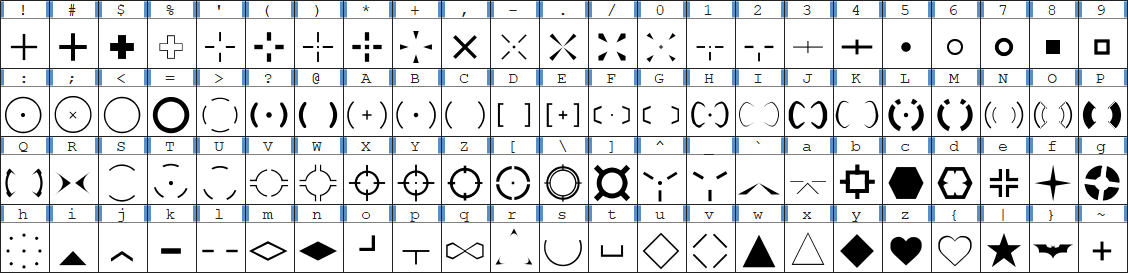
Note: If you have the default TF2 crosshair enabled, you'll also have to disable it by using crosshair 0 in the console.
If your crosshair isn't aligned properly change the xpos and ypos values.
- Open
WoolHUD/resource/crosshairs/crosshair_animation.txt. - Uncomment the lines inside
event DamagedPlayer.
Note: Make sure the FgColor in the 2nd line is the same as your crosshair color in crosshair.res.

- ⭐ Recommended customizations
- ⭐ Main Menu
- ⭐ Game Timers
- ⭐ Main Menu Labels
- ⭐ Payload Panel
- ⭐ Control Point
- Disguise Status Panel
- Item Effect Meter Labels
- TargetID
- Transparent Viewmodels
- Backpack & Class Loadout Panels
- SourceScheme
- Critical Damage Numbers
- CTF Panel
- Inspect Panel
- Lower Spectator TargetID
- Payload Race Panel
- Gamemode, Autobalance etc. Notifications
- Team Menu