2.1 Player Input Overview
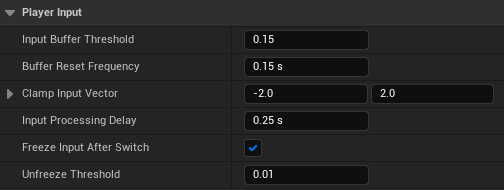
Player can perform actions that can be evaluated as successful or unsuccessful:
-
EnableTargeting():
Performs either to find a new Target or to clear the captured Target. Always evaluated as successful. -
SwitchTargetYaw/Pitch():
Consumes input to InputBuffer, that hasInputBufferThreshold, on overflow of which will perform to switch the Target.
Most of the time is evaluated as unsuccessful. It'll only be evaluated as successful on InputBuffer overflow.
After a successful action, the input will be blocked for a while. The time can be specified with
InputProcessingDelay.
This behaviour can be disabled by setting this value to 0.f, but it's not recommended in multiplayer games, 'cause it can prevent the reliable buffer overflow.
Note: InputBuffer filling is frame rate independent.
If bFreezeInputAfterSwitch is enabled, then InputBuffer filling can be frozen after a successful switch action. Frozen means that you can't switch the Target. To unfreeze InputBuffer filling, the raw Input must be less than UnfreezeThreshold, or, in other words, stop moving the mouse or stick.
Sometimes, with particular controllers, the SwitchTarget action may not be called.
This is happened when InputBuffer is cleared too early.
The controller doesn't have enough time to overflow InputBuffer,
'cause it's cleared by the timer with BufferResetFrequency specified.
To solve this problem, you can:
- Increase
BufferResetFrequency. - Decrease
InputBufferThresholdand/orClampInputVector. - Increase the axis values before passing them to the SwitchTargetPitch/Yaw methods. [recommended]