Features Smart Capture
Smart Capture automatically triggers speedtests when DOCSight detects signal degradation, capturing real performance data at the exact moment problems occur.
Availability: Requires Speedtest Tracker integration. Enable in Settings > Smart Capture.
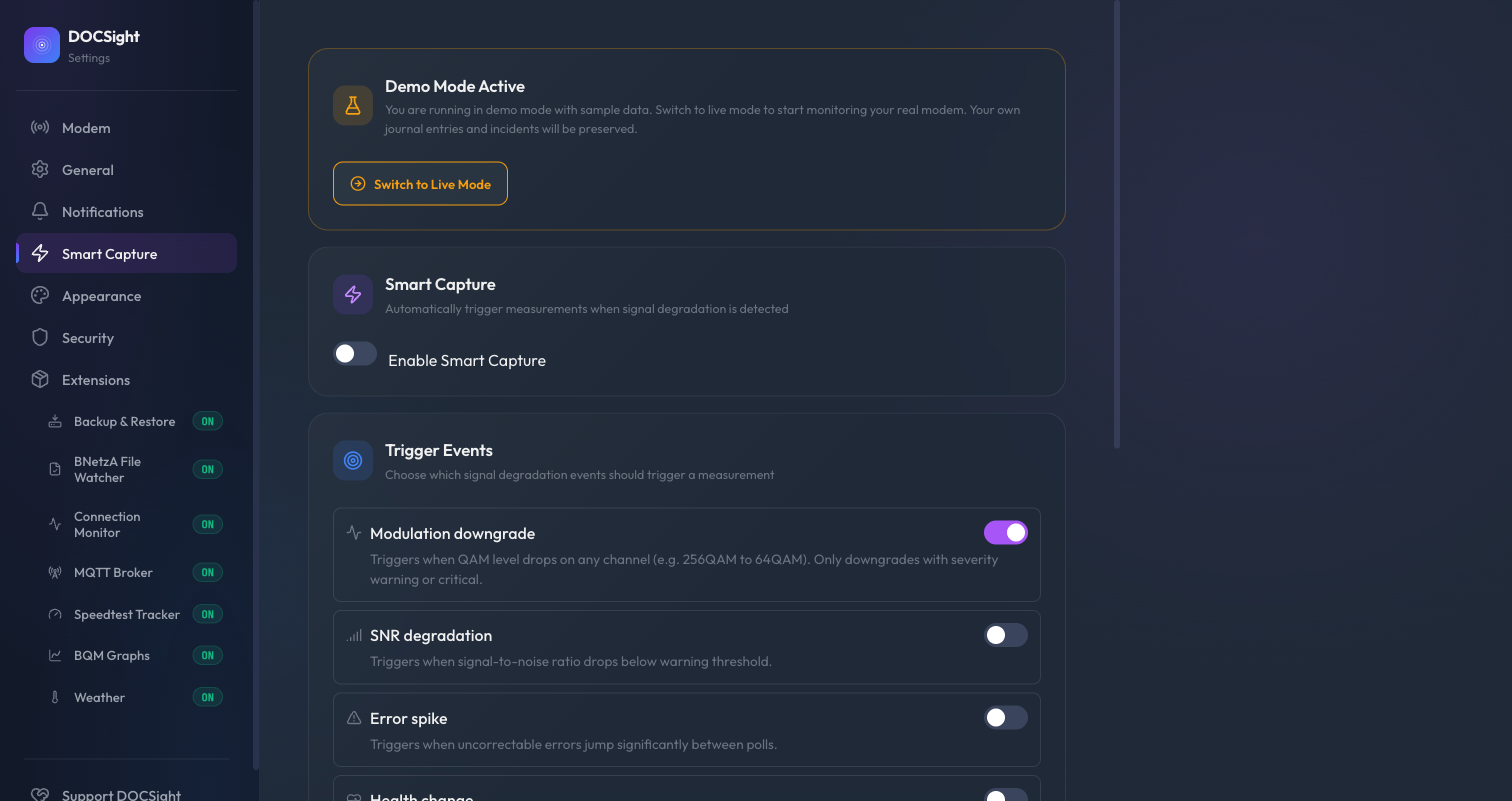
Signal degradation is often fleeting. Your downstream SNR drops for ten minutes during peak hours, or your modem briefly falls back to a lower QAM level. By the time you notice and manually run a speedtest, conditions have already recovered. Smart Capture solves this timing problem by firing a speedtest automatically the moment degradation is detected, so you get performance evidence that matches the signal event.
- Event detection -- DOCSight's event detector spots a signal change (modulation downgrade, SNR drop, error spike, health state change, or packet loss warning)
- Trigger matching -- Smart Capture checks whether the event matches any enabled trigger and passes its sub-settings filter (direction, QAM threshold, etc.)
- Guardrail evaluation -- Flapping detection, cooldowns, and hourly limits are checked to prevent excessive testing
- Action firing -- If all guardrails pass, the Speedtest Tracker adapter triggers a new speedtest
- Result linking -- When the speedtest completes, Smart Capture matches the result back to the triggering event
The entire chain runs automatically. Each execution is logged with its status, so you can see exactly what happened and why.
| Trigger | Description | Default |
|---|---|---|
| Modulation downgrade | Fires when QAM level drops on any channel (e.g. 256QAM to 64QAM). Only downgrades with severity warning or critical. | Enabled |
| SNR degradation | Fires when signal-to-noise ratio drops below warning threshold | Disabled |
| Error spike | Fires when uncorrectable errors jump significantly between polls | Disabled |
| Health change | Fires when connection health degrades to marginal or critical | Disabled |
| Packet loss warning | Fires when the Connection Monitor module detects high packet loss on any target | Disabled |
Only modulation downgrade is enabled by default. The other triggers can produce more frequent events depending on your line quality, so enable them gradually and monitor the execution history.
Each trigger can be fine-tuned with additional settings that appear when the trigger is enabled:
Modulation downgrade:
- Direction -- Downstream only, Upstream only, or Both (default: Both)
- Min QAM level -- Only trigger when modulation drops at or below a specific level. Full dropdown from 4096QAM (DOCSIS 3.1) down to 8QAM. Default: Any downgrade.
Error spike:
- Min error delta -- Minimum uncorrectable error jump to trigger. Set to 0 (default) to trigger on any spike.
Health change:
- Level -- Any degradation (default) or Critical only. "Any degradation" triggers on any downward health change (tolerated to marginal, marginal to critical, etc.).
Packet loss warning:
- Min packet loss % -- Minimum packet loss percentage to trigger. Default: 5.0%. Note: this threshold must be at or above the Connection Monitor's own warning threshold to have effect.
SNR degradation:
- No sub-settings in the current version (downstream-only detection).
Smart Capture includes rate limiting to prevent excessive speedtest triggers:
| Guardrail | Default | Description |
|---|---|---|
| Global cooldown | 300s (5 min) | Minimum time between any two Smart Capture actions. Set to 0 to disable. |
| Per-trigger cooldown | 900s (15 min) | Minimum time between actions from the same trigger type. Set to 0 to disable. |
| Max actions per hour | 4 | Hard limit on total speedtest triggers per hour |
| Flapping detection | 3 events in 3600s | Blocks all triggers if more than 3 trigger matches occur within one hour. Prevents runaway testing during sustained instability. |
Guardrails are evaluated in order: flapping detection first, then global cooldown, per-trigger cooldown, and hourly limit. If any guardrail blocks, the execution is logged as suppressed with the reason.
The settings panel shows a table of recent executions with timestamp, trigger type, status, and details. Statuses:
| Status | Meaning |
|---|---|
| Pending | Trigger matched and guardrails passed, waiting for adapter |
| Fired | Speedtest was successfully triggered |
| Completed | Speedtest result was matched back to this execution |
| Suppressed | A guardrail blocked execution (reason shown in details) |
| Expired | No result was matched within the time window, or the adapter was unavailable |
Smart Capture enriches existing DOCSight views rather than adding a separate page:
-
Event Log --
smart_capture_triggeredevents appear with the triggering signal event details - Speedtest results -- Triggered tests are highlighted with a "Smart Capture" badge and a subtle row highlight
- Correlation timeline -- Smart Capture entries appear as a "Capture" source alongside signal and speedtest data, showing the full evidence chain
- Configure Speedtest Tracker -- Smart Capture needs a working Speedtest Tracker integration to fire speedtests
- Enable Smart Capture -- Go to Settings > Smart Capture and toggle "Enable Smart Capture"
- Choose triggers -- Enable the signal events you want to react to and adjust their sub-settings
- Adjust guardrails -- The defaults work well for most setups. Lower the cooldowns if you want more aggressive capture, raise them if your line is noisy.
All Smart Capture settings can be configured via environment variables. These override values from config.json.
| Variable | Default | Description |
|---|---|---|
SC_ENABLED |
false |
Enable Smart Capture |
SC_GLOBAL_COOLDOWN |
300 |
Minimum seconds between any two captures |
SC_TRIGGER_COOLDOWN |
900 |
Minimum seconds between same-trigger captures |
SC_MAX_ACTIONS_PER_HOUR |
4 |
Maximum speedtest triggers per hour |
SC_FLAPPING_WINDOW |
3600 |
Time window in seconds for flapping detection |
SC_FLAPPING_THRESHOLD |
3 |
Trigger matches within flapping window before blocking |
| Variable | Default | Description |
|---|---|---|
SC_TRIGGER_MODULATION |
true |
Trigger on QAM modulation downgrades |
SC_TRIGGER_SNR |
false |
Trigger on SNR degradation |
SC_TRIGGER_ERROR_SPIKE |
false |
Trigger on uncorrectable error spikes |
SC_TRIGGER_HEALTH |
false |
Trigger on health state changes |
SC_TRIGGER_PACKET_LOSS |
false |
Trigger on Connection Monitor packet loss warnings |
| Variable | Default | Description |
|---|---|---|
SC_TRIGGER_MODULATION_DIRECTION |
both |
Direction filter: both, DS, or US
|
SC_TRIGGER_MODULATION_MIN_QAM |
(empty) | Min QAM level, e.g. 256QAM, 64QAM. Empty = any downgrade |
SC_TRIGGER_ERROR_SPIKE_MIN_DELTA |
0 |
Minimum error delta to trigger. 0 = any spike |
SC_TRIGGER_HEALTH_LEVEL |
any_degradation |
any_degradation or critical_only
|
SC_TRIGGER_PACKET_LOSS_MIN_PCT |
5.0 |
Minimum packet loss % to trigger |